
How to break tasks into smaller steps?
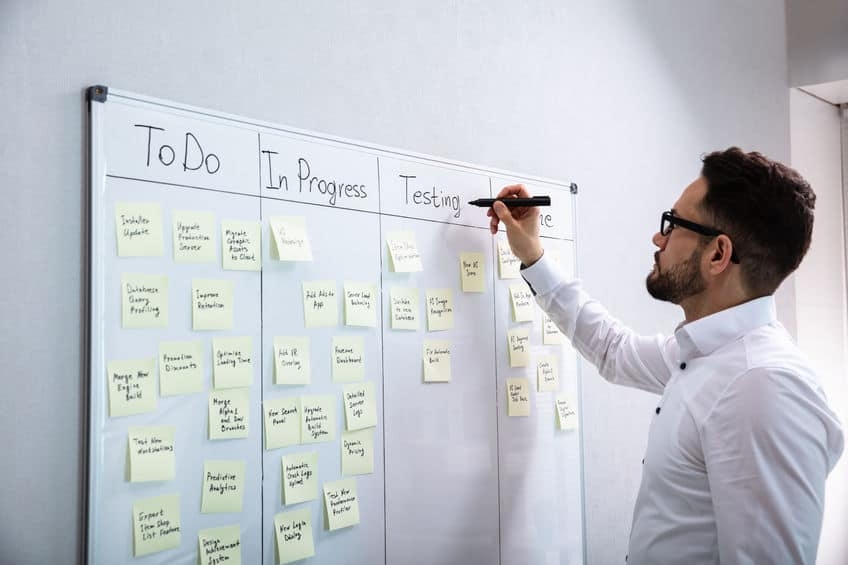
How to Break Tasks Into Smaller Steps
One of the most common reasons people procrastinate, feel overwhelmed, or fail to start work is not lack of ability—but the perception that a task is too large, too complex, or too undefined to begin. When a task feels big, the brain tends to treat it as a single intimidating unit rather than a sequence of manageable actions. This leads to avoidance, delay, and mental resistance.
Breaking tasks into smaller steps is one of the most effective productivity skills because it transforms vague, overwhelming goals into clear, actionable behaviors. It reduces cognitive load, lowers emotional resistance, and creates a structured path forward.
This article explains in depth how to break tasks into smaller steps, why it works psychologically, and how to apply it consistently in real-world situations.
Why Large Tasks Feel Overwhelming
Before learning how to break tasks down, it is important to understand why large tasks create resistance in the first place.
When you think of a task like:
-
“Write a research paper”
-
“Study for exams”
-
“Build a website”
your brain does not automatically see the individual steps involved. Instead, it processes the task as a single abstract object.
This creates several problems:
1. Cognitive Overload
Large tasks contain many hidden subcomponents:
-
Planning
-
Research
-
Execution
-
Editing
-
Review
Your working memory struggles to hold all of this at once.
2. Uncertainty
Vague tasks lack clear starting points:
-
Where do I begin?
-
What comes first?
Uncertainty increases hesitation.
3. Emotional Resistance
Big tasks often trigger:
-
Anxiety (“I might fail”)
-
Overwhelm (“This is too much”)
-
Perfectionism (“It has to be perfect”)
These emotions reduce motivation.
4. Perceived Effort Inflation
The mind tends to overestimate the difficulty of large tasks, making them feel heavier than they actually are.
The Core Principle of Task Breakdown
Task breakdown is based on a simple principle:
A large task is just a collection of smaller, executable actions.
Instead of seeing:
-
“Write essay”
You see:
-
Open document
-
Write outline
-
Draft introduction
-
Expand paragraph 1
-
Edit and refine
Each step is:
-
Small
-
Clear
-
Actionable
The goal is to reduce every task to a level where starting feels easy.
Step 1: Define the End Goal Clearly
Before breaking anything down, you need clarity on what “done” looks like.
Ask:
-
What is the final outcome?
-
What does completion mean?
Examples:
-
Essay → completed document submitted
-
Project → functional version delivered
-
Study goal → understanding a chapter or topic
Without a clear endpoint, breaking tasks becomes inconsistent.
Step 2: Identify Major Phases
Every large task has natural stages.
For example, writing an essay might include:
-
Research
-
Planning
-
Writing
-
Editing
A project might include:
-
Design
-
Implementation
-
Testing
-
Deployment
These are not yet small steps—they are categories of work.
Step 3: Break Each Phase Into Actions
Now convert each phase into specific actions.
Example: Essay Writing
Research phase
-
Search for sources
-
Read 2–3 articles
-
Take notes
Planning phase
-
Create outline
-
Define thesis statement
Writing phase
-
Write introduction
-
Write body paragraph 1
-
Write body paragraph 2
Editing phase
-
Check grammar
-
Improve clarity
-
Final review
Each action should be something you can physically start without further planning.
Step 4: Apply the “Visible Action Test”
A useful rule:
If you cannot physically start it in under 30 seconds, it is still too big.
Compare:
Too large:
-
“Improve essay”
Better:
-
“Open document and read paragraph 1”
The second is actionable immediately.
Step 5: Use the “Verb + Object” Format
Each step should be written as:
-
A verb (action)
-
An object (what you act on)
Examples:
-
Write introduction
-
Read chapter 3
-
Solve question 5
-
Open project file
Avoid vague phrasing like:
-
“Work on essay”
-
“Study math”
Clarity is essential.
Step 6: Break Until It Feels Easy
A key principle:
Keep breaking the task down until each step feels almost too easy to ignore.
If a step still feels heavy, it is not small enough.
For example:
Large:
-
“Study biology”
Smaller:
-
“Open biology notes”
-
“Read one page”
-
“Highlight key terms”
The goal is frictionless entry.
Step 7: Sequence the Steps Logically
Once broken down, arrange steps in order.
Ask:
-
What must happen first?
-
What depends on previous steps?
Example sequence:
-
Open document
-
Create outline
-
Write section 1
-
Write section 2
-
Edit
This creates a clear workflow.
Step 8: Focus Only on the Next Step
A common mistake is trying to think about the entire sequence while working.
Instead:
-
Focus only on the current step
-
Ignore the rest temporarily
This reduces overwhelm and increases execution.
Step 9: Convert Tasks Into “Startable Units”
A powerful technique is designing tasks that can be started instantly.
Examples:
Instead of:
-
“Prepare presentation”
Break into:
-
Open slides
-
Create title slide
-
Add first bullet point
Each unit should be immediately executable.
Step 10: Use Time-Based Micro-Steps
Sometimes tasks can be broken down by time instead of action size.
Examples:
-
Work for 5 minutes
-
Write for 10 minutes
-
Read for 1 page
This reduces pressure to complete everything at once.
Step 11: Apply the “First 5 Minutes Rule”
The hardest part is starting.
So define:
-
Only the first 5 minutes
Example:
-
“Just write for 5 minutes”
-
“Just study for 5 minutes”
Once started, continuation becomes more natural.
Step 12: Anticipate Hidden Subtasks
Many tasks fail because they contain hidden steps.
For example:
-
Writing requires research
-
Studying requires organization
-
Coding requires setup
Always ask:
-
What am I assuming is already done?
Then explicitly include those steps.
Step 13: Make Progress Visible
Breaking tasks into steps also allows tracking.
Use:
-
Checklists
-
Progress markers
This creates motivation through visible progress.
Step 14: Reduce Decision Points
Too many choices slow execution.
Task breakdown should:
-
Remove ambiguity
-
Define exact actions
Instead of deciding what to do next, you simply follow the list.
Step 15: Adjust Breakdown Based on Context
Not all tasks need deep breakdown.
Use:
-
Simple breakdown for routine tasks
-
Detailed breakdown for complex or unfamiliar tasks
Flexibility is important.
Common Mistakes in Task Breakdown
1. Not Breaking Far Enough
Steps still feel too big.
2. Overcomplicating Simple Tasks
Turning small tasks into overly detailed lists.
3. Losing the Sequence
Steps are not ordered logically.
4. Including Non-Actionable Steps
Steps that still require planning.
Psychological Benefits of Task Breakdown
Breaking tasks into smaller steps has strong cognitive effects:
Reduces Anxiety
Smaller tasks feel less threatening.
Increases Motivation
Progress becomes visible quickly.
Lowers Resistance
Starting becomes easier.
Builds Momentum
Each completed step encourages the next.
Real-World Example
Task: “Study for exam”
Broken down:
-
Open textbook
-
Identify chapter 1
-
Read section 1
-
Write 3 key points
-
Review notes
-
Take short break
-
Repeat for next section
Now the task is no longer abstract—it is a sequence of actions.
Conclusion
Breaking tasks into smaller steps is one of the most powerful productivity techniques because it transforms overwhelming goals into manageable actions.
Instead of facing a large, vague objective, you create a structured pathway:
-
Clear
-
Sequential
-
Actionable
The key principle is simple:
If a task feels hard to start, it is not too difficult—it is not broken down enough.
By continuously reducing tasks until each step feels easy, you eliminate uncertainty, reduce emotional resistance, and make consistent action far more likely.
Ultimately, productivity is not about doing more at once—it is about making the next step always clear enough to take.
- Arts
- Business
- Computers
- Jocuri
- Health
- Home
- Kids and Teens
- Money
- News
- Personal Development
- Recreation
- Regional
- Reference
- Science
- Shopping
- Society
- Sports
- Бизнес
- Деньги
- Дом
- Досуг
- Здоровье
- Игры
- Искусство
- Источники информации
- Компьютеры
- Личное развитие
- Наука
- Новости и СМИ
- Общество
- Покупки
- Спорт
- Страны и регионы
- World

 English
 Russian
 French
 Spanish
 Portuguese
 Deutsch
 Turkish
 Dutch
Dutch
 Italiano
 Arabic
 Portuguese (Brazil)
 Greek
Greek