
PaaS Architecture Diagram: The Visual Blueprint Behind Modern Application Platforms
There is a strange paradox at the heart of cloud computing.
The more sophisticated a platform becomes, the simpler it often appears.
A developer logs into a console, clicks a deployment button, and an application springs to life. Databases connect. Containers scale. Security policies activate. Monitoring dashboards begin collecting telemetry. Everything appears frictionless.
Yet behind that apparent simplicity sits a remarkably intricate architecture.
That is where the PaaS architecture diagram enters the conversation.
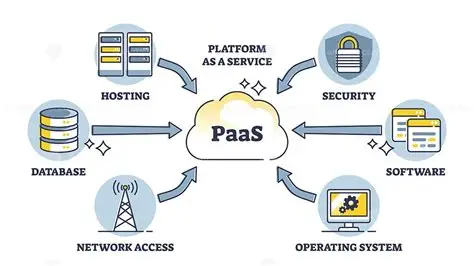
At first glance, a Platform as a Service (PaaS) architecture diagram looks like a collection of boxes connected by arrows. Application layer. Middleware layer. Database services. Networking components. Management tools. Security controls.
Simple enough.
But a closer examination reveals something more consequential. A PaaS architecture diagram is not merely a technical drawing. It is a visual representation of priorities. It captures what the platform automates, what developers control, and where operational responsibility shifts from the enterprise to the provider.
Understanding that distinction has become increasingly important as organizations invest heavily in cloud-native application development. The architecture diagram serves as the Rosetta Stone that translates platform capabilities into practical business outcomes.
And surprisingly, many professionals who use PaaS every day never fully learn how to read one.
Why PaaS Architecture Diagrams Matter More Than Most People Think
Technology leaders often focus on features.
Can the platform support containers?
Does it offer managed databases?
What monitoring tools are included?
These questions matter, of course. But they are tactical.
Architecture diagrams answer a more strategic question:
How does everything work together?
A well-designed PaaS architecture diagram exposes relationships that product brochures frequently obscure. It illustrates data movement, security boundaries, scaling mechanisms, service dependencies, and management workflows.
In other words, it reveals the platform’s operating philosophy.
That matters because architectural decisions influence performance, reliability, cost, and maintainability long after the initial deployment.
A platform is never just a collection of services. It is an ecosystem.
The diagram makes that ecosystem visible.
The Core Components of a PaaS Architecture Diagram
Although implementations vary across providers, most PaaS architecture diagrams share a common structure.
Think of the diagram as a layered city rather than a collection of isolated buildings.
Every layer performs a specific role while supporting the layers above it.
User Access Layer
This is where interaction begins.
Users, administrators, developers, and external systems connect through various interfaces:
- Web browsers
- APIs
- Mobile applications
- Third-party integrations
The access layer serves as the platform's front door.
What appears to users as a simple application request initiates a surprisingly complex chain of events deeper within the architecture.
Application Layer
The application layer contains the workloads developers actually create.
These may include:
- Web applications
- APIs
- Microservices
- Serverless functions
- Business applications
This is typically the most visible layer because it represents the organization's customer-facing functionality.
Yet it is only one piece of the overall structure.
Runtime Environment Layer
The runtime layer often receives less attention than it deserves.
Its responsibilities include:
- Code execution
- Container orchestration
- Language runtimes
- Middleware services
- Session management
The runtime environment abstracts away infrastructure complexity, allowing developers to focus on application logic rather than server administration.
This abstraction is one of the defining characteristics of Platform as a Service.
Data Services Layer
Modern applications generate astonishing amounts of data.
The data services layer supports:
- Relational databases
- NoSQL databases
- Object storage
- Caching systems
- Data replication services
Architecture diagrams often depict this layer beneath the application environment because nearly every business process eventually converges on data management.
Applications come and go.
Data tends to remain.
Infrastructure Layer
At the foundation lies the infrastructure layer.
This includes:
- Compute resources
- Virtual machines
- Networking
- Storage systems
- Physical hardware
Interestingly, this layer is often hidden from developers in PaaS environments.
That invisibility is intentional.
One of the platform's primary promises is reducing infrastructure management burdens.
A Typical PaaS Architecture Diagram Explained
A simplified representation often resembles this:
Users
   │
Load Balancer
   │
Application Services
   │
Runtime Environment
   │
Managed Databases
   │
Infrastructure Resources
The elegance of this arrangement can be deceptive.
Each layer contains multiple subsystems operating simultaneously.
A single user request may travel through authentication services, API gateways, container clusters, caching mechanisms, databases, monitoring tools, and logging systems before generating a response.
The architecture diagram compresses this complexity into a format humans can understand.
That compression is precisely what makes diagrams valuable.
The Most Important Arrows on the Diagram
People naturally focus on boxes.
Architects focus on arrows.
Boxes represent components.
Arrows represent behavior.
An arrow indicates:
- Data flow
- Service communication
- Dependency relationships
- Security boundaries
- Event propagation
Several years ago, I participated in a cloud migration project involving a rapidly growing customer-facing application. The team spent weeks debating service selection, deployment pipelines, and storage technologies.
The breakthrough occurred during a whiteboard session.
Someone redrew the architecture and emphasized only the arrows.
Immediately, hidden bottlenecks became obvious. A critical authentication service sat directly in the path of nearly every transaction. A monitoring dependency created unnecessary latency. Several integrations lacked redundancy.
The components themselves were not the issue.
The interactions were.
That experience permanently changed how I evaluate architecture diagrams. The flow between services often matters more than the services themselves.
Comparing Traditional Hosting and PaaS Architecture
The differences become clearer when viewed side by side.
| Architecture Element | Traditional Hosting | PaaS Environment |
|---|---|---|
| Server Management | Customer-managed | Provider-managed |
| Operating System Maintenance | Customer-managed | Provider-managed |
| Application Code | Customer-managed | Customer-managed |
| Middleware Configuration | Customer-managed | Mostly automated |
| Database Scaling | Manual effort | Automated options |
| Security Updates | Customer responsibility | Shared responsibility |
| Monitoring Infrastructure | Built internally | Platform-integrated |
| Resource Provisioning | Manual process | Automated provisioning |
| Deployment Complexity | High | Reduced |
| Operational Overhead | Significant | Lower |
The table highlights a critical shift.
PaaS architecture is fundamentally about responsibility redistribution.
The architecture diagram visualizes exactly where that redistribution occurs.
Security Architecture: The Layer Everyone Notices After a Breach
Security components have expanded dramatically within modern PaaS diagrams.
Several years ago, security often appeared as a side note.
Today, it occupies center stage.
Common security elements include:
Identity and Access Management
Controls user authentication and authorization.
Encryption Services
Protects data at rest and in transit.
Network Segmentation
Limits exposure between workloads.
Secrets Management
Protects credentials, certificates, and API keys.
Threat Detection
Continuously monitors suspicious activity.
What is particularly interesting is how modern diagrams increasingly embed security throughout the architecture rather than isolating it in a dedicated section.
Security is no longer a perimeter function.
It has become architectural DNA.
Scalability: The Feature Hidden in Plain Sight
One of the most revealing aspects of a PaaS architecture diagram is how it handles growth.
Traditional environments often scale vertically.
More CPU.
More memory.
Bigger servers.
PaaS platforms generally favor horizontal scaling.
More instances.
More containers.
More distributed workloads.
Architecture diagrams commonly depict this through replicated application services positioned behind load balancers.
The visual message is subtle but powerful.
The platform assumes growth.
Scalability is not treated as an exception.
It is embedded into the design itself.
Monitoring and Observability Layers
An architecture diagram from ten years ago might have dedicated only a small corner to monitoring.
Today, observability often occupies an entire layer.
That shift reflects broader industry priorities.
Organizations increasingly recognize that visibility influences reliability.
Modern diagrams frequently include:
- Log aggregation
- Metrics collection
- Distributed tracing
- Alerting systems
- Performance analytics
These components transform architecture diagrams from deployment blueprints into operational blueprints.
Building an application is one challenge.
Understanding its behavior in production is another.
The architecture must support both.
Common Mistakes When Reading a PaaS Architecture Diagram
Many professionals misinterpret diagrams because they focus exclusively on technology components.
Three recurring mistakes stand out.
Mistake One: Ignoring Shared Services
Services such as monitoring, identity management, and logging frequently support multiple workloads simultaneously.
Treating them as isolated components creates an incomplete understanding of platform behavior.
Mistake Two: Overlooking Data Movement
Data flows often determine performance outcomes more than compute resources.
The arrows matter.
Sometimes they matter enormously.
Mistake Three: Assuming Every Component Is Optional
Architecture diagrams frequently include services that appear supplemental.
In reality, many platform services are deeply interconnected.
Removing one component can create cascading effects elsewhere.
How PaaS Architecture Diagrams Are Evolving
The architecture diagrams appearing today differ significantly from those of just a few years ago.
Several trends stand out.
First, containers increasingly occupy the center of platform designs.
Second, serverless services are becoming integrated rather than peripheral.
Third, AI capabilities are beginning to appear as native platform services rather than external integrations.
Fourth, observability layers continue to expand.
These developments suggest a broader shift.
Platforms are evolving from infrastructure abstraction tools into comprehensive application ecosystems.
The architecture diagrams reflect that evolution.
Each new layer represents another responsibility transferred away from developers and operations teams.
Conclusion: A Diagram Is Never Just a Diagram
The most revealing aspect of a PaaS architecture diagram is not the technology it contains.
It is the philosophy it encodes.
Every box reflects a design decision.
Every arrow reflects a dependency.
Every layer reveals assumptions about who should manage complexity and who should be shielded from it.
That is why architecture diagrams deserve more attention than they often receive. They are not decorative appendices attached to technical documentation. They are condensed expressions of strategic intent.
Look carefully at any modern PaaS architecture diagram and a provocative question emerges:
If platforms continue absorbing infrastructure, middleware, security, monitoring, scaling, and operational management, what remains as the primary responsibility of the developer?
The answer may be simpler than many expect.
Not managing systems.
Not configuring servers.
Not maintaining infrastructure.
Just building value.
And perhaps that is the most radical architectural shift of all.
- Arts
- Business
- Computers
- Juegos
- Health
- Home
- Kids and Teens
- Money
- News
- Personal Development
- Recreation
- Regional
- Reference
- Science
- Shopping
- Society
- Sports
- Бизнес
- Деньги
- Дом
- Досуг
- Здоровье
- Игры
- Искусство
- Источники информации
- Компьютеры
- Личное развитие
- Наука
- Новости и СМИ
- Общество
- Покупки
- Спорт
- Страны и регионы
- World

 English
 Russian
 French
 Portuguese
 Deutsch
 Turkish
 Dutch
Dutch
 Italiano
 Arabic
 Romaian
 Portuguese (Brazil)
 Greek
Greek