
Understanding Emulators: Bridging the Gap Between Platforms
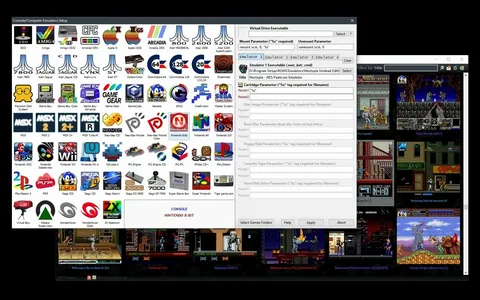
In the world of digital technology, emulators are software programs that allow one system to mimic the behavior of another. They create virtual environments that enable users to run applications or games designed for different hardware or operating systems. Emulators have become a crucial tool for a wide range of purposes, from gaming to software development, offering both convenience and functionality. This article delves into what emulators are, their uses, and the benefits they provide to users across various fields.
What Are Emulators?
An emulator is a program that enables one computer system (called the host) to imitate the functionality of another system (called the guest). By replicating the behavior of the guest system, the emulator allows software or games written for that system to run on the host system. This process can simulate hardware, operating systems, or software environments, enabling compatibility between different platforms.
For example, a video game emulator can allow a user to play classic console games on a personal computer, a mobile phone, or even a different gaming console. Similarly, software emulators can allow applications designed for one operating system, like Windows, to run on others, such as macOS or Linux.
The Many Uses of Emulators
-
Video Game Emulation: One of the most popular uses of emulators is in the gaming community. Emulators allow players to experience games from older consoles (e.g., NES, SNES, PlayStation) on modern devices like PCs, laptops, or smartphones. This enables gamers to enjoy a vast library of retro titles that may no longer be available through traditional hardware.
-
Cross-Platform Development: Developers use emulators to test software across multiple platforms without needing access to physical devices. For example, mobile app developers use emulators to test their applications on various phone models and operating systems like Android and iOS, ensuring that the app works well across different devices.
-
Software Compatibility: Emulators help run legacy software that may no longer be supported on modern operating systems. For instance, many businesses use emulators to run older software applications that are critical to their operations but cannot be run on current hardware due to outdated systems.
-
Educational Purposes: Emulators are often used in educational settings to teach students about computer architecture, operating systems, and hardware. They provide a safe and cost-effective environment for students to explore and experiment without needing access to actual hardware.
-
Security and Malware Analysis: Cybersecurity professionals use emulators to test malware in a controlled environment. Emulating the target system allows analysts to safely observe how malicious software behaves without risking the integrity of their primary operating system.
Benefits of Using Emulators
-
Cost Efficiency: Emulators provide a cost-effective solution for accessing software or games from different platforms without the need to purchase additional hardware. This is especially helpful for people who want to play retro games or test software on multiple devices.
-
Convenience: Emulators offer the convenience of running applications or games on modern devices. For example, you can play console games on your laptop, test mobile apps on your desktop, or run legacy software on a modern PC—all without needing to maintain the original hardware.
-
Cross-Platform Compatibility: One of the most significant advantages of emulators is their ability to bridge the gap between different platforms. This feature is essential for developers, as it allows them to create cross-platform software that functions seamlessly across a range of operating systems and devices.
-
Preservation of Software and Games: Emulators are also valuable tools for preserving older software and games that may no longer be available or supported. By emulating old systems, users can continue to experience these digital artifacts long after the original hardware has become obsolete.
-
Customization and Control: Emulators often provide users with customization options that go beyond what the original hardware or software allowed. For example, players can tweak graphics, save game states, or modify controls, enhancing their experience.
Types of Emulators
-
Console Emulators: These emulate gaming consoles like the Nintendo Entertainment System (NES), Super Nintendo (SNES), Sega Genesis, and PlayStation. Popular examples include SNES9x, ePSXe, and PCSX2.
-
Mobile Emulators: Mobile emulators allow users to run Android or iOS applications on a desktop or laptop computer. Examples include BlueStacks for Android and Xcode for iOS.
-
Operating System Emulators: These emulate entire operating systems, such as running Windows on a macOS system or vice versa. Examples include Parallels Desktop for Mac or VirtualBox.
-
Hardware Emulators: These emulate the functionality of specific hardware components, such as CPUs or GPUs, allowing developers to test performance and compatibility without needing access to the actual hardware.
-
Software Emulators: These emulate specific software environments, such as older versions of operating systems or specialized applications. DOSBox, for instance, emulates the DOS environment for running older DOS-based programs.
Legal and Ethical Considerations
While emulators themselves are legal, the use of certain emulators, particularly in the context of video games, can raise legal and ethical concerns. For example, downloading and using game ROMs (read-only memory files) without owning the original game may infringe on intellectual property rights. Users should always ensure they are using emulators and ROMs in compliance with local laws and copyright regulations.
Conclusion
Emulators are powerful tools that provide flexibility, convenience, and cost-efficiency by bridging the gap between different systems. From allowing gamers to revisit classic titles to enabling developers to test software across multiple platforms, emulators have become essential in many industries. Whether for personal entertainment, educational purposes, or software development, emulators offer a wide range of possibilities, making technology more accessible and adaptable than ever before.
- Arts
- Business
- Computers
- Oyunlar
- Health
- Home
- Kids and Teens
- Money
- News
- Personal Development
- Recreation
- Regional
- Reference
- Science
- Shopping
- Society
- Sports
- Бизнес
- Деньги
- Дом
- Досуг
- Здоровье
- Игры
- Искусство
- Источники информации
- Компьютеры
- Личное развитие
- Наука
- Новости и СМИ
- Общество
- Покупки
- Спорт
- Страны и регионы
- World

 English
 Russian
 French
 Spanish
 Portuguese
 Deutsch
 Dutch
Dutch
 Italiano
 Arabic
 Romaian
 Portuguese (Brazil)
 Greek
Greek
