
What Reports Should I Use in AdWords?
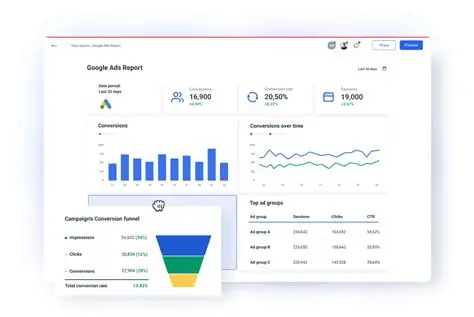
Google AdWords (Google Ads) generates an enormous amount of data. Every impression, click, search term, and conversion is logged and reported in detail. For many advertisers, this abundance of data becomes overwhelming rather than helpful. The key to success is not seeing more data—it is knowing which reports actually matter and how to interpret them.
Reports in Google Ads serve one primary purpose: to help advertisers make better decisions. The right reports reveal inefficiencies, highlight growth opportunities, and explain why performance changes. The wrong reports waste time and create noise.
This article provides a comprehensive guide to the most important AdWords reports, how to use them, which metrics matter most, and how to turn reporting into actionable insights rather than passive observation.
Why Reporting Matters in Google Ads
Reporting is the foundation of optimization.
Without reporting, you cannot:
-
Identify wasted spend
-
Understand user intent
-
Improve Quality Score
-
Scale winning campaigns
Reports turn guesswork into strategy.
Understanding the Google Ads Reporting Interface
Google Ads reporting exists across multiple layers.
Key reporting areas include:
-
Campaign view
-
Ad group view
-
Keyword view
-
Reports section
-
Custom dashboards
Each serves a different analytical purpose.
Core Metrics Every Advertiser Should Understand
Before using reports, understand key metrics.
Essential metrics include:
-
Impressions
-
Clicks
-
Click-through rate (CTR)
-
Cost per click (CPC)
-
Conversions
-
Cost per conversion
-
Conversion rate
-
Return on ad spend (ROAS)
Metrics are signals, not answers.
Campaign Performance Report
The campaign report provides a high-level view.
Use it to:
-
Compare campaign efficiency
-
Allocate budgets
-
Identify underperformers
This report answers “Which campaigns deserve attention?”
Ad Group Performance Report
Ad group reports provide granularity.
They help you:
-
Identify relevance issues
-
Compare keyword themes
-
Spot structural problems
Strong campaigns are built from strong ad groups.
Keyword Performance Report
The keyword report is central to optimization.
Use it to:
-
Identify high-converting keywords
-
Pause low-performing terms
-
Adjust bids
Keywords drive both cost and intent.
Search Terms Report (One of the Most Important)
The search terms report shows what users actually searched.
This report helps:
-
Discover negative keywords
-
Find new keyword opportunities
-
Understand user intent
Many wasted budgets come from ignoring this report.
Negative Keyword Discovery Using Reports
Negative keywords reduce irrelevant traffic.
Use reports to:
-
Identify unrelated queries
-
Exclude research-only searches
-
Prevent budget leakage
Negative keyword management is ongoing.
Ads Performance Report
This report compares ad variations.
Use it to:
-
Measure CTR differences
-
Evaluate conversion performance
-
Identify message alignment issues
Poor ads hurt Quality Score and cost.
Responsive Search Ads Asset Report
RSA asset reports show headline and description performance.
Use them to:
-
Remove weak assets
-
Add diverse messaging
-
Avoid repetition
Asset-level insight improves automation outcomes.
Quality Score Report
Quality Score affects cost and visibility.
Key components include:
-
Expected CTR
-
Ad relevance
-
Landing page experience
Monitor changes—not just scores.
Landing Page Performance Insights
Landing page performance influences conversion rate.
Analyze:
-
Conversion rate by page
-
Bounce signals
-
Message match
Ad performance depends on post-click experience.
Audience Performance Report
Audience reports show how segments perform.
Use them to:
-
Identify high-value audiences
-
Apply bid adjustments
-
Inform targeting strategy
Audiences add context to intent.
Device Performance Report
User behavior varies by device.
Analyze:
-
CPC by device
-
Conversion rate by device
-
Cost per conversion
Device-level optimization improves efficiency.
Geographic Performance Report
Location reports reveal regional differences.
Use them to:
-
Increase bids in strong areas
-
Exclude weak regions
-
Create location-specific campaigns
Local data is often overlooked.
Time and Day Performance Report
Ad scheduling insights matter.
Analyze:
-
Hour-of-day performance
-
Day-of-week trends
Use this data for dayparting decisions.
Auction Insights Report
Auction insights show competitive dynamics.
Metrics include:
-
Impression share
-
Overlap rate
-
Outranking share
This report explains why performance changes.
Impression Share Report
Impression share reveals missed opportunity.
Track:
-
Lost IS (budget)
-
Lost IS (rank)
This report guides scaling and bidding decisions.
Conversion Tracking Report
Conversion reports ensure accuracy.
Use them to:
-
Validate tracking
-
Compare conversion actions
-
Diagnose drops or spikes
Bad data ruins optimization.
Attribution Reports
Attribution reports explain conversion paths.
They show:
-
Assisted conversions
-
Multi-touch journeys
Attribution helps evaluate upper-funnel keywords.
Search vs Display Performance Reports
Different networks behave differently.
Compare:
-
CTR
-
CPC
-
Conversion quality
Never optimize both with the same expectations.
Performance by Network Report
This report separates:
-
Search Network
-
Display Network
-
Search partners
Network segmentation improves clarity.
Budget Utilization Reports
Budget reports show spend efficiency.
Use them to:
-
Avoid limited budgets
-
Reallocate spend
-
Improve impression share
Budget data affects growth.
Custom Reports in Google Ads
Custom reports allow deeper analysis.
You can:
-
Combine metrics
-
Apply filters
-
Save views
Custom reports reduce noise.
Dashboards: Turning Data Into Insight
Dashboards summarize key metrics.
Effective dashboards:
-
Focus on business goals
-
Update automatically
-
Avoid vanity metrics
Dashboards support decision-making.
Using Google Analytics With AdWords Reports
Google Analytics adds depth.
It provides:
-
Behavior metrics
-
Funnel analysis
-
Engagement insights
Ads data alone is incomplete.
Cross-Channel Reporting Considerations
Users interact across channels.
Combine reports from:
-
Paid search
-
Organic search
-
Social ads
Context improves interpretation.
Report Frequency Best Practices
Different reports need different cadences.
-
Daily: spend and errors
-
Weekly: search terms and ads
-
Monthly: strategic trends
Avoid daily over-analysis.
Turning Reports Into Action
Data without action is useless.
Each report should answer:
-
What changed?
-
Why did it change?
-
What should I do next?
Insight drives improvement.
Common Reporting Mistakes
Avoid:
-
Tracking too many metrics
-
Ignoring conversion quality
-
Chasing CTR alone
Reports should serve strategy.
Simplifying Reporting for Small Accounts
Small accounts need fewer reports.
Focus on:
-
Search terms
-
Keywords
-
Conversions
Complexity does not equal effectiveness.
Scaling Reporting for Large Accounts
Large accounts need automation.
Use:
-
Scheduled reports
-
Scripts
-
Data connectors
Scale insight, not just spend.
Reporting as a Competitive Advantage
Many advertisers don’t analyze deeply.
Those who do:
-
Waste less budget
-
Optimize faster
-
Scale smarter
Reporting discipline creates advantage.
Reports Evolve Over Time
As campaigns mature:
-
KPIs change
-
Focus shifts
-
Insights deepen
Reporting should evolve too.
The Strategic Role of Reporting
Reporting is not a task—it is a mindset.
It connects:
-
Strategy
-
Execution
-
Outcomes
Strong reporting enables strong decisions.
Conclusion
Google AdWords reporting is the backbone of successful campaign management. Knowing which reports to use—and how to interpret them—separates advertisers who react from those who lead. From search terms and keyword performance to audience insights and auction dynamics, each report provides a different lens on performance.
The goal of reporting is not to collect data, but to uncover truth. When advertisers focus on meaningful metrics, build clear dashboards, and consistently turn insights into action, Google Ads becomes a predictable, scalable, and profitable acquisition channel.
- Arts
- Business
- Computers
- Jogos
- Health
- Início
- Kids and Teens
- Money
- News
- Personal Development
- Recreation
- Regional
- Reference
- Science
- Shopping
- Society
- Sports
- Бизнес
- Деньги
- Дом
- Досуг
- Здоровье
- Игры
- Искусство
- Источники информации
- Компьютеры
- Личное развитие
- Наука
- Новости и СМИ
- Общество
- Покупки
- Спорт
- Страны и регионы
- World

 English
 Russian
 French
 Spanish
 Portuguese
 Deutsch
 Turkish
 Dutch
Dutch
 Italiano
 Arabic
 Romaian
 Greek
Greek