
What are must-have desk accessories?
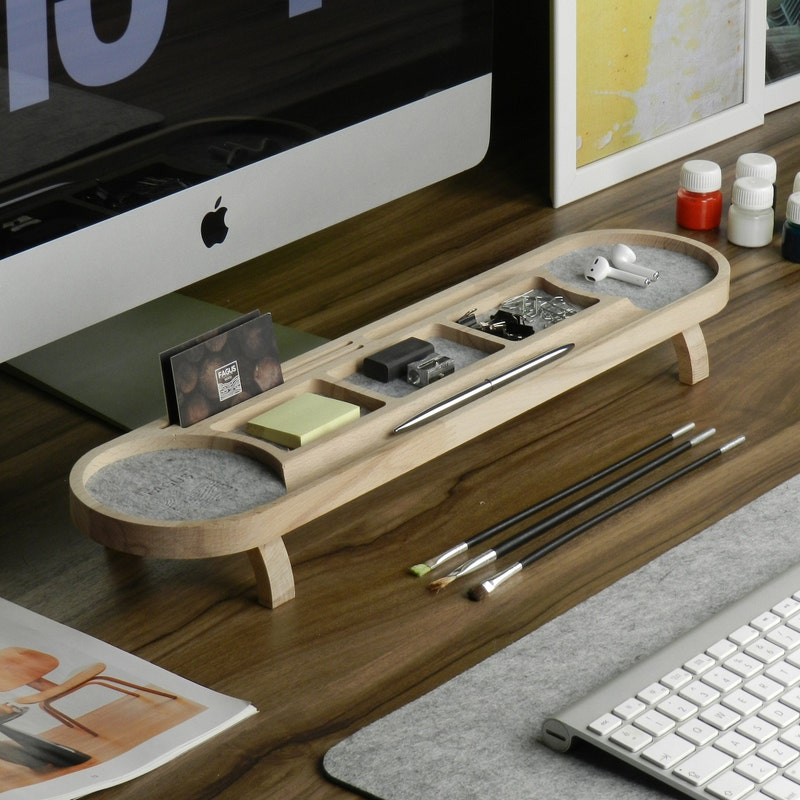
The desk looked perfect in photos.
Soft lighting. Minimal objects. A single laptop centered like it had achieved enlightenment. A ceramic mug placed at a deliberate angle, untouched, probably for aesthetic purposes more than hydration.
Then real work started.
Within twenty minutes, the illusion collapsed. A tangle of charging cables appeared like they had been hiding beneath the surface all along. Pens scattered. Sticky notes multiplied. A second notebook emerged from nowhere. Someone’s forgotten USB drive became urgent. The “minimalist desk” started behaving like a nervous system under pressure.
That’s the reality most productivity advice skips over.
Desks aren’t static design objects.
They’re active work environments.
And what sits on them quietly shapes how people think, focus, and recover from cognitive overload throughout the day.
Must-have desk accessories aren’t about decoration. They’re about reducing friction, stabilizing attention, and making work less mentally expensive than it otherwise would be.
The best ones disappear into routine until the moment they’re missing.
Most Desk Problems Are Not Big — They’re Repetitive
Productivity rarely collapses from one dramatic failure.
It breaks slowly through repetition:
- Searching for pens
- Re-adjusting posture all day
- Untangling cables again
- Losing track of notes
- Switching between cluttered tasks
- Fighting poor lighting without noticing it consciously
Each interruption feels minor in isolation.
But desks operate in accumulation.
One manager once told me her team didn’t feel “unproductive,” just “constantly interrupted by small things.” That sentence stayed with me because it captures the real issue perfectly.
Must-have desk accessories exist to eliminate exactly those micro-disruptions.
Not to impress anyone.
Not to signal aesthetics.
To preserve uninterrupted thought.
The Desk Accessories That Actually Matter
Not every trendy workspace gadget deserves space near your keyboard.
Some products exist because they photograph well. Others exist because they genuinely change how work feels minute by minute.
Here’s a grounded breakdown of essentials:
| Desk Accessory | Core Function | Productivity Impact | Common Mistake |
|---|---|---|---|
| Ergonomic Chair | Supports posture | Sustains focus over time | Choosing style over support |
| Monitor Stand | Improves eye level alignment | Reduces fatigue | Ignoring screen height entirely |
| Desk Lamp | Controls lighting quality | Reduces cognitive strain | Poor placement causing glare |
| Cable Organizer | Removes visual clutter | Improves mental clarity | Over-complicating simple setups |
| Notebook | Captures thoughts quickly | Reduces digital switching | Letting notes scatter everywhere |
| Pen Holder | Ensures tool availability | Reduces interruption loops | Allowing pen loss cycles |
| Wrist Support | Reduces strain | Extends working comfort | Ignoring repetitive strain signals |
| Desk Mat | Defines workspace zone | Improves structure | Treating it as purely decorative |
| Sticky Notes | External memory system | Supports prioritization | Overloading desk surfaces |
| Noise Control Tools | Reduces distraction | Protects concentration | Wearing constantly without breaks |
The theme is consistent.
Good desk accessories don’t add complexity.
They remove hesitation.
Ergonomics Is Not Optional — It’s Operational
People underestimate how much physical discomfort quietly drains attention.
A poorly adjusted chair doesn’t feel like a problem at first. It feels like something to “get used to.” That phrase alone is a red flag.
Because adaptation is not resolution.
It’s compensation.
I ignored ergonomics for years while working long editing sessions. My logic was simple: focus should matter more than furniture. Then I upgraded to a properly adjusted chair and monitor setup during a demanding project timeline.
The change wasn’t dramatic.
It was cumulative.
Less shifting.
Less distraction from discomfort.
Fewer breaks caused by physical irritation I had previously normalized.
The lesson was uncomfortable:
I had been losing focus in tiny increments I didn’t notice.
Ergonomic desk accessories don’t create productivity.
They protect it from physical erosion.
Lighting Changes More Than People Expect
Lighting is one of those variables people rarely question until it becomes unbearable.
Too harsh and concentration tightens.
Too dim and fatigue accelerates.
Uneven lighting creates visual tension that builds quietly throughout the day.
A proper desk lamp is not aesthetic—it’s functional stabilization.
One creative team I worked with discovered something interesting after adjusting workspace lighting across their office. Complaints about afternoon fatigue dropped noticeably, even though workloads stayed identical.
Nothing else changed.
Only light quality.
That’s how subtle productivity improvements often are.
They don’t announce themselves.
They accumulate.
Cable Management Is a Cognitive Tool, Not a Cosmetic One
Messy cables don’t just look chaotic.
They behave like visual noise.
Every exposed wire contributes to background cognitive load, even if no one consciously registers it.
A clean cable system does something surprisingly important:
it reduces micro-decisions.
Where is the charger?
Which cable belongs to what device?
Why is this cord tangled again?
Those questions seem insignificant until they repeat dozens of times per week.
I once helped reorganize a shared workspace where employees constantly complained about “small distractions.” Cable clutter turned out to be a major contributor. After implementing simple routing clips and under-desk trays, complaints dropped without any workflow changes.
No software.
No training.
Just physical order restored.
Desk Organization Is About Reducing Search Time
Most desks fail not because they lack storage.
They fail because items don’t have consistent placement.
People underestimate how often they search for:
- Pens
- Notes
- Chargers
- USB drives
- Printed references
Each search interrupts cognitive flow.
A well-designed desk reduces retrieval time almost to zero.
The principle is simple:
frequently used items should require no thought to access.
That’s why desk organizers matter more than they appear to at first glance. Not because they look tidy, but because they remove friction between intention and action.
The Notebook Problem Nobody Talks About
Digital tools dominate workflow systems now.
But notebooks still survive everywhere.
Not because they’re outdated, but because they solve a different problem: rapid thought capture without interface delay.
Opening an app takes seconds.
Finding the right window takes more.
Waiting for synchronization adds friction.
A notebook is immediate.
That immediacy matters during:
- Brainstorming
- Meetings
- Sudden ideas
- Quick task mapping
I once tried replacing all handwritten notes with a tablet system for consistency. It worked structurally. It failed cognitively. I started capturing fewer spontaneous ideas because the process felt slightly heavier.
That subtle friction changed behavior.
Now I treat notebooks as cognitive capture tools rather than nostalgic accessories.
Noise Control Became a Core Desk Requirement
Open environments reshaped what desk accessories even mean.
Noise-canceling headphones are no longer optional for many workers. They function as attention boundaries in environments that lack physical ones.
But there’s an important nuance here.
Constant headphone use can also create fatigue if overused. The best setups treat noise control as a tool, not a permanent condition.
Other accessories that support acoustic focus include:
- Desk dividers
- Soft material desk pads
- Controlled background sound environments
The goal isn’t silence.
It’s predictable sound conditions.
Wrist Support and Micro-Comfort Matter More Than People Admit
Repetitive strain doesn’t appear suddenly.
It accumulates.
A wrist rest, ergonomic keyboard angle, or properly positioned mouse pad may seem minor. But over long work sessions, these adjustments reduce tension that otherwise builds quietly throughout the body.
One developer I interviewed described it simply: “I didn’t realize I was uncomfortable until I stopped being uncomfortable.”
That’s how ergonomic improvement usually reveals itself.
Not as transformation.
As relief.
Desk Mats Do More Than People Think
Desk mats often get treated as aesthetic upgrades.
They do more than that.
They:
- Define workspace boundaries
- Reduce surface friction
- Organize visual space
- Create consistency across tools
- Improve writing stability
A defined surface subtly structures behavior. People interact differently with tools when the workspace feels intentional rather than scattered.
It’s not decorative.
It’s spatial organization.
A Lesson I Learned From a Completely Wrong Desk Setup
Years ago, I set up what I believed was an “optimized” minimalist desk.
White surface.
Single monitor.
Hidden cables.
One notebook.
One pen.
It looked perfect.
It performed terribly.
The problem wasn’t minimalism itself. It was rigidity. I had removed too many micro-tools that supported actual workflow variability.
I spent more time leaving the desk to retrieve things than I saved by keeping it visually clean.
Eventually I rebuilt it differently:
not minimal,
but intentional.
Everything had a place based on frequency, not aesthetics.
That shift changed how I think about desk design entirely.
The Most Important Desk Accessories Are Invisible in Practice
The best desk accessories don’t feel like “tools” once they’re integrated.
They become background infrastructure:
- You stop noticing cable management
- You stop searching for pens
- You stop adjusting posture constantly
- You stop thinking about lighting
- You stop interrupting yourself for small tasks
That disappearance is the signal of success.
Not visual perfection.
Operational quietness.
What Actually Belongs on a Productive Desk
If you strip away aesthetic trends and focus on function, must-have desk accessories usually fall into four categories:
1. Physical Comfort Tools
Chairs, wrist supports, monitor stands.
2. Attention Protection Tools
Lighting, noise control, visual organization.
3. Workflow Acceleration Tools
Notebooks, pens, organizers.
4. Environmental Structure Tools
Desk mats, cable systems, defined zones.
Everything else is optional depending on job type.
The Desk Is Not a Stage — It’s a System
There’s a subtle shift that happens when people stop treating desks as aesthetic displays and start treating them as working systems.
The question changes from:
“What looks good here?”
to:
“What interrupts me less here?”
That’s where productivity actually lives.
Not in perfect arrangement.
Not in curated minimalism.
But in reduced friction across dozens of tiny daily actions that either preserve attention or fracture it.
A well-equipped desk doesn’t call attention to itself.
It disappears into the background of good work.
And that’s the real goal.
- Arts
- Business
- Computers
- Juegos
- Health
- Home
- Kids and Teens
- Money
- News
- Personal Development
- Recreation
- Regional
- Reference
- Science
- Shopping
- Society
- Sports
- Бизнес
- Деньги
- Дом
- Досуг
- Здоровье
- Игры
- Искусство
- Источники информации
- Компьютеры
- Личное развитие
- Наука
- Новости и СМИ
- Общество
- Покупки
- Спорт
- Страны и регионы
- World

 English
 Russian
 French
 Portuguese
 Deutsch
 Turkish
 Dutch
Dutch
 Italiano
 Arabic
 Romaian
 Portuguese (Brazil)
 Greek
Greek
