
How Is Persistent Storage Managed?
The application was working perfectly.
Until it wasn't.
A team had just completed a successful migration to a cloud platform. Deployment times had improved. Infrastructure responsibilities had decreased. Developers were shipping features faster than ever.
Then a routine restart occurred.
The application came back online.
The data did not.
The problem wasn't a software bug.
It wasn't a failed deployment.
It was a misunderstanding.
The team had treated temporary storage as permanent storage.
They assumed that because the application was running successfully, the data it created would survive the lifecycle of the application environment.
It didn't.
That moment revealed a lesson that appears repeatedly in cloud architecture:
Storage decisions are rarely visible when everything works.
They become obvious when something changes.
This is especially true in Platform as a Service (PaaS) environments, where infrastructure abstraction creates enormous operational benefits while also changing how teams think about data persistence.
Which leads to a fundamental question:
How is persistent storage managed?
The technical answer involves volumes, databases, object storage, and platform services.
The strategic answer is more interesting.
Persistent storage is about ensuring that important information survives change.
Because applications change constantly.
Servers restart.
Containers are replaced.
Platforms scale.
Deployments evolve.
Data, however, often needs to remain.
Understanding Persistent Storage
To understand persistent storage, it helps to begin with its opposite.
Ephemeral storage.
Ephemeral storage exists temporarily.
It is created for a specific runtime environment and disappears when that environment is destroyed.
Containers provide a common example.
A container may create files during execution.
Those files exist while the container runs.
When the container is replaced, those files may disappear.
This behavior is intentional.
Modern cloud platforms are designed around replacement rather than repair.
Instead of fixing individual servers, platforms create new environments when needed.
That approach improves reliability and scalability.
But it creates a clear requirement:
Important data must live somewhere outside the temporary runtime environment.
That "somewhere" is persistent storage.
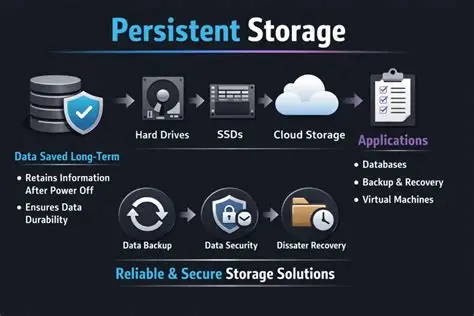
Persistent storage ensures that information survives:
- Application restarts
- Server replacement
- Container recreation
- Platform scaling
- Software deployments
- Infrastructure changes
The application may change.
The data remains.
Why Persistent Storage Matters in PaaS Environments
PaaS platforms simplify infrastructure management by hiding many operational details.
Developers typically do not manage:
- Physical storage devices
- Server hardware
- Operating system maintenance
- Storage controller configuration
- Data center operations
The platform handles those responsibilities.
But applications still generate valuable information.
Customer records.
Uploaded files.
Transaction histories.
Configuration data.
Analytics information.
The platform abstraction does not eliminate storage requirements.
It simply changes how storage is provided and managed.
The key difference is ownership.
Traditional infrastructure teams often manage storage directly.
PaaS teams typically consume storage services.
That shift is subtle.
It is also significant.
The Main Types of Persistent Storage in PaaS
Persistent storage is not a single technology.
Different workloads require different approaches.
The most common categories include:
Managed Databases
For many applications, databases represent the primary persistent storage layer.
Examples include:
- PostgreSQL
- MySQL
- Microsoft SQL Server
- MongoDB
- Redis
Managed databases allow organizations to store structured or semi-structured information without managing database infrastructure directly.
The provider typically handles:
- Provisioning
- Patching
- Replication
- Backups
- Availability management
The application connects through standard database protocols.
The experience feels familiar.
The operational burden is reduced.
Object Storage
Object storage has become essential for modern applications.
It is commonly used for:
- Images
- Videos
- Documents
- Backups
- Archives
- Data exports
Examples include:
- Amazon S3
- Google Cloud Storage
- Azure Blob Storage
Object storage differs from traditional file systems.
Instead of organizing information around folders and files on a server, it stores objects with associated metadata.
This model scales extremely well.
It is particularly valuable for applications that handle large amounts of unstructured data.
Persistent Volumes
Some PaaS environments support persistent volume concepts.
These provide storage that remains available even when application instances change.
Common use cases include:
- Stateful applications
- Shared application files
- Specialized workloads
Persistent volumes create a bridge between traditional storage models and cloud-native architectures.
They provide durability without requiring direct hardware management.
Managed File Systems
Some applications require traditional file system behavior.
Examples include:
- Shared directories
- Content management systems
- Legacy applications
Managed file storage services provide persistent access while removing much of the administrative burden.
How Persistent Storage Is Managed in PaaS
The management process usually involves several layers.
Each layer addresses a different concern.
Provisioning
The first step is creating storage resources.
Depending on the platform, this may involve:
- Selecting storage types
- Defining capacity
- Configuring access policies
- Connecting applications
Modern PaaS environments increasingly automate this process.
Developers define requirements.
The platform provisions resources.
Attachment and Integration
Once storage exists, applications need access.
This typically occurs through:
- Environment variables
- Connection strings
- Service bindings
- API integrations
- Platform-managed credentials
The goal is to create secure connections without exposing unnecessary infrastructure details.
Scaling
Storage requirements change.
A small application today may become a high-volume platform tomorrow.
Persistent storage systems must support growth through:
- Increased capacity
- Performance improvements
- Replication
- Geographic distribution
Scalability is not just about having more space.
It is about maintaining reliability as demand increases.
Security Management
Persistent storage contains valuable information.
Security practices often include:
- Encryption at rest
- Encryption in transit
- Access controls
- Identity management
- Audit logging
Security cannot be treated as an optional layer.
Storage and security are inseparable.
Comparing Storage Approaches in PaaS
The differences become clearer when viewed directly.
| Storage Type | Best For | Advantages | Challenges | Common PaaS Usage |
|---|---|---|---|---|
| Managed Database | Application data | Structured queries, reliability, transactions | Requires database design expertise | Very common |
| Object Storage | Files and media | Massive scalability, durability | Different access model | Very common |
| Persistent Volumes | Stateful applications | Familiar storage behavior | More operational complexity | Moderate |
| Managed File Systems | Shared files | Traditional file access | Higher cost | Specialized |
| Ephemeral Storage | Temporary data | Fast and simple | Data disappears | Runtime processing |
The table reveals an important pattern.
There is no universal storage solution.
The right choice depends on what the application needs to preserve.
The Difference Between Storage and State Management
One of the most common architectural mistakes is confusing storage with state management.
Storage answers:
"Where does information live?"
State management answers:
"How does the application behave because of that information?"
A database can store customer information.
But application architecture determines how that information influences workflows, permissions, transactions, and user experiences.
Persistent storage is foundational.
It is not the entire architecture.
The distinction matters because organizations sometimes solve the storage problem while overlooking the broader state problem.
A Lesson Learned About Storage Design
I once worked with a company that had moved aggressively toward cloud-native development.
The engineering team had embraced modern deployment practices.
Applications were containerized.
Infrastructure was automated.
Releases were frequent.
Everything looked sophisticated.
Then the team launched a new customer feature involving user-generated content.
The application performed well during testing.
Production was different.
The feature generated far more data than expected.
The original design stored important files directly inside application containers.
It worked.
Until scaling began.
As new instances appeared, data consistency problems emerged.
The team eventually redesigned the architecture around object storage and managed databases.
The technical fix was straightforward.
The organizational lesson was more valuable.
Cloud-native applications are designed around replaceable compute.
Persistent information requires a different mindset.
The application environment is temporary.
The data environment must be durable.
That distinction should influence architecture from the beginning.
Common Persistent Storage Mistakes
Several patterns appear repeatedly.
Treating Local Storage as Permanent
Temporary environments are not reliable data stores.
If data matters, it needs dedicated persistence.
Ignoring Backup Strategies
Persistence does not automatically mean recoverability.
Storage systems still require backup planning.
Overlooking Performance
Storage decisions affect application speed.
Latency and throughput matter.
Creating Unnecessary Complexity
Not every application needs a sophisticated storage architecture.
Simple solutions often outperform complicated ones.
Forgetting Data Lifecycle Management
Data accumulates.
Organizations need policies for retention, archiving, and deletion.
Storage management is also information management.
The Future of Persistent Storage Management
Persistent storage continues moving toward greater abstraction.
Developers increasingly expect platforms to handle:
- Provisioning
- Scaling
- Replication
- Backup automation
- Security controls
The direction is clear.
Storage management is becoming less about operating infrastructure and more about defining requirements.
Yet the fundamental challenge remains unchanged.
Organizations must decide what information matters.
How long it matters.
Who can access it.
How quickly it must be recovered.
Technology can simplify storage.
It cannot replace judgment.
Conclusion: The Data Must Outlast the Application
Applications are temporary.
Even successful applications.
They are updated.
Rebuilt.
Migrated.
Scaled.
Replaced.
The data they create often has a much longer lifespan.
That is why persistent storage matters.
In a PaaS environment, managing persistent storage is not about maintaining disks or hardware.
It is about designing systems where valuable information survives constant change.
The strongest organizations understand this distinction.
They do not ask only where their applications run.
They ask where their knowledge lives.
Because software can be recreated.
Infrastructure can be replaced.
But the information that powers customer relationships, business decisions, and organizational memory requires something more durable.
Persistent storage is ultimately not a technical convenience.
It is a commitment that the things an organization learns, creates, and protects will remain available when everything else changes.
- Arts
- Business
- Computers
- Games
- Health
- Home
- Kids and Teens
- Money
- News
- Personal Development
- Recreation
- Regional
- Reference
- Science
- Shopping
- Society
- Sports
- Бизнес
- Деньги
- Дом
- Досуг
- Здоровье
- Игры
- Искусство
- Источники информации
- Компьютеры
- Личное развитие
- Наука
- Новости и СМИ
- Общество
- Покупки
- Спорт
- Страны и регионы
- World

 Russian
 French
 Spanish
 Portuguese
 Deutsch
 Turkish
 Dutch
Dutch
 Italiano
 Arabic
 Romaian
 Portuguese (Brazil)
 Greek
Greek