
Can I Use Docker with PaaS?
A developer once told me something that perfectly captured the tension many engineering teams feel when choosing a cloud platform.
“We want the simplicity of PaaS,” he said, “but we don’t want to give up Docker.”
That sentence sounds like a technical preference.
It is actually a strategic question.
Because behind the discussion about Docker and Platform as a Service is a much larger organizational challenge:
How much control should a team maintain, and how much complexity should it delegate?
For years, developers viewed these choices as opposing forces.
Docker represented portability.
PaaS represented convenience.
Docker gave teams control over application environments.
PaaS removed infrastructure responsibilities.
The assumption was that organizations had to pick one philosophy.
That assumption no longer holds.
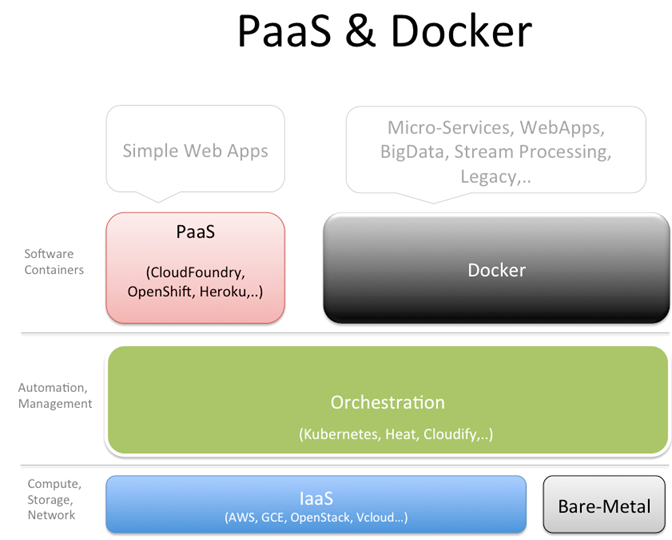
Modern PaaS platforms increasingly support Docker, allowing teams to package applications in containers while still benefiting from managed deployment, scaling, monitoring, and operational automation.
So the answer to the original question is simple:
Yes, you can use Docker with PaaS.
The more interesting question is whether you should—and what that combination means for your architecture, your team, and your long-term strategy.
Why Docker Became Important for Cloud Deployment
To understand why Docker and PaaS work well together, it helps to understand the problem Docker solved.
Before containers became mainstream, software deployment often suffered from environmental differences.
A developer’s laptop had one configuration.
The testing environment had another.
Production had a third.
Applications behaved differently depending on where they ran.
Docker introduced a new approach.
Instead of deploying only application code, developers could package the entire runtime environment.
A Docker container could include:
- Application code
- Libraries
- Dependencies
- Runtime configuration
- System requirements
The result was consistency.
The application ran the same way everywhere.
That reliability changed expectations around software delivery.
The Original PaaS Model
Traditional PaaS platforms approached deployment differently.
The goal was simplicity.
Developers provided application code.
The platform handled:
- Runtime configuration
- Server management
- Scaling
- Deployment automation
- Infrastructure operations
This model worked extremely well for many teams.
A developer could deploy an application without becoming an infrastructure expert.
However, there was a tradeoff.
Traditional PaaS environments often required applications to follow platform-specific conventions.
Developers accepted convenience in exchange for reduced customization.
Docker changed that balance.
How Docker and PaaS Work Together
Modern PaaS platforms often support Docker through a straightforward workflow:
- Developers create a Dockerfile.
- The application is packaged into a container image.
- The image is uploaded or connected through a repository.
- The PaaS platform runs and manages the container.
The developer controls the application environment.
The platform manages the operational layer.
This division of responsibility is one of the strongest arguments for combining Docker with PaaS.
Teams gain flexibility without taking on every infrastructure task themselves.
Docker Support Across Popular PaaS Platforms
Not every PaaS provider handles Docker the same way.
Some are container-first.
Others support Docker as one option among several.
Docker Support Comparison
| PaaS Platform | Docker Support | Deployment Method | Best Fit |
|---|---|---|---|
| Google Cloud Run | Excellent | Container image deployment | Cloud-native applications |
| Render | Excellent | Dockerfile or image deployment | Startups and SaaS teams |
| Fly.io | Excellent | Container-based deployment | Distributed applications |
| Railway | Good | Dockerfile-based workflows | Developers and prototypes |
| Azure App Service | Excellent | Linux containers | Enterprise applications |
| AWS Elastic Beanstalk | Excellent | Docker environments | AWS-focused teams |
| OpenShift | Excellent | Kubernetes containers | Enterprise platforms |
| Heroku | Good | Container Registry | Teams needing simplicity |
| Platform.sh | Excellent | Container-based workflows | Multi-environment applications |
The pattern is clear.
Docker support is no longer unusual.
It has become a standard capability across much of the PaaS market.
The Benefits of Using Docker with PaaS
Combining Docker and PaaS creates several important advantages.
1. Greater Application Portability
One of Docker’s biggest strengths is portability.
Applications packaged as containers are easier to move between environments.
A team can develop locally, test in staging, and deploy to production with fewer surprises.
This flexibility reduces dependence on platform-specific behaviors.
It also provides strategic freedom.
Organizations are less constrained by a single deployment model.
2. More Control Over Dependencies
Traditional PaaS deployments often rely on supported runtimes.
Docker changes that.
Developers decide:
- Which operating system components exist
- Which runtime versions are installed
- Which dependencies are included
This matters especially for specialized applications.
Machine learning systems.
Legacy software.
Custom frameworks.
Internal tools.
Docker expands possibilities.
3. Easier Support for Multiple Languages
Without containers, PaaS platforms often organize support around programming languages.
Python.
Java.
Node.js.
.NET.
Ruby.
Docker changes the equation.
The platform does not need to understand every language.
It needs to run the container.
This makes it easier to deploy less common technologies.
4. Consistent Development Workflows
Many teams already use Docker locally.
Using Docker in production creates continuity.
The same image can move through the entire development lifecycle.
That consistency improves reliability.
Fewer environment surprises.
Fewer deployment mysteries.
The Tradeoff: Docker Adds Responsibility
Docker creates flexibility.
Flexibility creates responsibility.
This is where teams need to think carefully.
A container does not automatically create a successful deployment strategy.
Teams still need to manage:
- Image security
- Container size
- Resource limits
- Logging
- Updates
- Vulnerability scanning
PaaS removes many infrastructure challenges.
It does not eliminate every operational responsibility.
Understanding this distinction prevents unrealistic expectations.
A Lesson Learned from a Docker Migration
Several years ago, I worked with a software company that decided to containerize every application.
The motivation was understandable.
The engineering team wanted consistency.
They wanted portability.
They wanted a modern deployment approach.
The transition produced real benefits.
But it also revealed an unexpected challenge.
The team initially believed Docker would simplify everything.
Instead, they discovered that Docker shifted complexity rather than eliminating it.
They now needed stronger processes around:
- Image management
- Security reviews
- Deployment standards
- Container monitoring
Eventually, they adopted a PaaS platform with strong Docker support.
The result was far better.
Docker provided application consistency.
The platform provided operational simplicity.
The lesson was important.
Technology works best when each layer solves the problem it was designed to solve.
Docker is excellent at packaging applications.
PaaS is excellent at managing application delivery.
Together, they create a stronger system.
When Docker with PaaS Makes the Most Sense
Docker is particularly valuable in certain situations.
Custom Application Environments
If your application requires specific dependencies or runtime versions, Docker provides control.
Microservices Architectures
Multiple services often require different environments.
Containers handle that complexity naturally.
Cloud Migration Projects
Organizations moving legacy applications to the cloud often use Docker as a transition strategy.
Multi-Cloud Strategies
Teams operating across multiple cloud providers benefit from container portability.
Growing Engineering Organizations
As teams expand, consistency becomes increasingly valuable.
Docker helps standardize development and deployment practices.
When You Might Not Need Docker
Despite its advantages, Docker is not always necessary.
A simple web application may deploy perfectly well using native PaaS runtimes.
For example:
A basic Node.js application.
A small Python API.
A simple company website.
In these situations, adding Docker may introduce unnecessary complexity.
The best architecture is not the most sophisticated one.
It is the one that matches the problem.
Docker vs Native PaaS Deployment
The choice often comes down to priorities.
| Factor | Native PaaS Deployment | Docker with PaaS |
| Setup complexity | Lower | Higher |
| Environment control | Limited | High |
| Portability | Moderate | High |
| Deployment speed | Very fast | Fast |
| Custom dependencies | Limited | Strong |
| Operational responsibility | Lower | Moderate |
| Best for | Simple applications | Complex applications |
Neither approach wins universally.
They optimize for different goals.
Does Docker Reduce PaaS Vendor Lock-In?
This is one of Docker’s most attractive benefits.
Organizations often worry about becoming too dependent on a single cloud provider.
Docker can reduce that risk.
A containerized application can often move between compatible environments more easily.
However, portability has limits.
Applications still depend on:
- Databases
- Networking configurations
- Cloud services
- Monitoring tools
Docker improves flexibility.
It does not eliminate every migration challenge.
That distinction matters.
The Future of Docker and PaaS
The relationship between Docker and PaaS will likely continue strengthening.
The market has moved beyond the idea that developers must choose between abstraction and control.
Modern platforms increasingly provide both.
Developers can package applications using Docker.
Platforms can handle operational complexity.
This balance reflects a broader trend in software infrastructure.
The most successful technologies often do not replace previous approaches.
They combine their strengths.
Conclusion: Docker and PaaS Are Better Together
So, can you use Docker with PaaS?
Absolutely.
For many modern applications, the combination represents one of the most practical approaches to cloud deployment.
Docker provides consistency.
Portability.
Control.
PaaS provides automation.
Scalability.
Operational simplicity.
The mistake is thinking the decision is about choosing one technology over another.
It is not.
The real question is how much responsibility your team wants to own.
A small team building a simple application may benefit from native PaaS deployment.
A growing engineering organization managing complex systems may benefit from Docker-powered PaaS workflows.
The strongest technology decisions rarely come from choosing the most powerful tool.
They come from choosing the right level of power for the challenge at hand.
Docker does not make PaaS unnecessary.
PaaS does not make Docker irrelevant.
Together, they represent something more valuable:
A way to build software with both freedom and focus.
- Arts
- Business
- Computers
- Jocuri
- Health
- Home
- Kids and Teens
- Money
- News
- Personal Development
- Recreation
- Regional
- Reference
- Science
- Shopping
- Society
- Sports
- Бизнес
- Деньги
- Дом
- Досуг
- Здоровье
- Игры
- Искусство
- Источники информации
- Компьютеры
- Личное развитие
- Наука
- Новости и СМИ
- Общество
- Покупки
- Спорт
- Страны и регионы
- World

 English
 Russian
 French
 Spanish
 Portuguese
 Deutsch
 Turkish
 Dutch
Dutch
 Italiano
 Arabic
 Portuguese (Brazil)
 Greek
Greek