
What Is a POS System? The Cash Register Grew Up—and Took Over the Business
Walk into a coffee shop at 8:15 a.m.
A customer taps a phone. A receipt appears instantly. Loyalty points update. Inventory counts change. The manager, who isn't even in the building, can see sales data on a smartphone. Somewhere in the background, labor scheduling software adjusts forecasts for the afternoon rush.
Most people think they just witnessed a transaction.
They didn't.
They witnessed a conversation between dozens of systems.
That's the modern point-of-sale system—commonly known as a POS system. And while the term sounds deceptively simple, it has evolved into one of the most influential technologies in commerce. The cash register used to sit at the edge of the customer experience. Today, the POS system sits at the center of the business itself.
That shift matters because retailers, restaurants, and service businesses no longer compete solely on products. They compete on convenience, personalization, speed, and operational precision. The POS system has become the mechanism that connects all four.
What Is a POS System?
A POS (Point of Sale) system is the combination of hardware and software a business uses to process customer transactions, accept payments, track sales, manage inventory, and collect operational data.
The phrase "point of sale" refers to the moment a customer completes a purchase. Historically, that meant a cash register and a drawer full of bills. Today, it means something much broader.
A modern POS system often includes:
- Payment processing
- Inventory management
- Customer relationship management (CRM)
- Employee scheduling and tracking
- Sales analytics
- Loyalty programs
- E-commerce integration
- Reporting and forecasting tools
Think of it this way: the transaction is merely the trigger. The real value comes from everything the system learns, records, and communicates afterward.
That's a subtle distinction, but an important one.
Businesses rarely buy POS systems because they need a way to collect money. They've always had ways to collect money. They buy POS systems because they need visibility.
And visibility has become one of the most valuable assets in modern commerce.
The Basic Components of a POS System
At its core, every POS system combines hardware and software.
Hardware
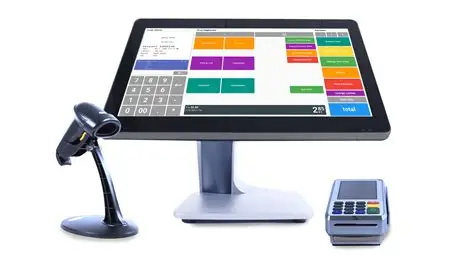
The physical components may include:
- Touchscreen terminal
- Tablet or mobile device
- Barcode scanner
- Receipt printer
- Cash drawer
- Card reader
- Customer-facing display
The configuration varies dramatically depending on the business.
A luxury boutique may use sleek tablets. A grocery store may rely on industrial-grade scanners. A food truck might process every transaction through a smartphone.
Different forms. Same purpose.
Software
The software acts as the intelligence layer.
It records purchases, tracks inventory levels, stores customer information, generates reports, and integrates with other business tools.
Without software, a POS terminal is little more than a payment collection device.
With software, it becomes a decision-making engine.
How a POS System Actually Works
The process appears simple because the technology hides the complexity.
Here's what happens when a customer buys an item:
- The item is scanned or selected.
- The software retrieves pricing information.
- Taxes and discounts are calculated.
- Payment is authorized.
- The transaction is recorded.
- Inventory counts update automatically.
- Customer records may be updated.
- Sales reports refresh in real time.
What looks like a two-second exchange often triggers hundreds of database actions.
The best technology tends to disappear into the background. POS systems are a perfect example. Customers barely notice them when they work well.
Businesses notice them constantly.
Why POS Systems Matter More Than Ever
One of the most common misconceptions is that POS systems are operational tools.
They're not.
They're strategic tools.
I learned this firsthand while consulting on a retail optimization project several years ago. The company believed its biggest challenge was declining store traffic. Leadership spent months debating marketing campaigns, advertising investments, and promotional strategies.
Then we looked at POS data.
The numbers revealed something unexpected. Traffic wasn't the problem. Conversion rates were. Customers were entering stores at healthy levels but leaving without purchasing.
That insight shifted the entire conversation.
Store layouts changed. Product placement changed. Employee training changed.
Sales improved.
The lesson was surprisingly simple: businesses often have opinions about what customers are doing. POS systems provide evidence.
And evidence usually wins.
Types of POS Systems
Not all POS systems are designed for the same environment.
Different business models require different capabilities.
Traditional POS Systems
These systems typically operate from fixed terminals.
They are common in:
- Grocery stores
- Department stores
- Large retail chains
Their strength lies in stability and high transaction volume.
Mobile POS Systems (mPOS)
Mobile POS systems run on smartphones or tablets.
They're popular among:
- Food trucks
- Pop-up shops
- Market vendors
- Service professionals
The appeal is flexibility.
Commerce no longer has to happen behind a counter.
Cloud-Based POS Systems
Cloud-based platforms store data online rather than on local servers.
Benefits include:
- Remote access
- Automatic updates
- Scalability
- Lower upfront costs
Many newer businesses prefer cloud-based solutions because they reduce infrastructure requirements.
Industry-Specific POS Systems
Restaurants, salons, hotels, and medical offices often require specialized functionality.
For example:
- Restaurants need table management.
- Salons need appointment scheduling.
- Hotels need reservation integration.
The transaction may be similar, but the workflow is entirely different.
POS System Comparison
The variety of POS solutions can make evaluation challenging. The table below highlights key differences.
| Feature | Traditional POS | Mobile POS | Cloud-Based POS | Industry-Specific POS |
|---|---|---|---|---|
| Initial Cost | High | Low | Moderate | Moderate to High |
| Mobility | Limited | Excellent | Good | Varies |
| Offline Capability | Strong | Moderate | Moderate | Varies |
| Real-Time Reporting | Limited | Strong | Excellent | Excellent |
| Scalability | Moderate | High | Very High | High |
| Maintenance Requirements | High | Low | Low | Moderate |
| Remote Access | Limited | Strong | Excellent | Strong |
| Best For | Large retailers | Small businesses | Growing companies | Specialized operations |
The important takeaway isn't that one category is better than another.
It's that alignment matters more than features.
The most sophisticated system in the world becomes a poor investment if it doesn't fit the business model.
Inventory Management: The Hidden Superpower
Ask business owners why they purchased a POS system and many will mention payment processing.
Ask them six months later what they value most, and inventory management frequently rises to the top.
Why?
Because inventory mistakes are expensive.
Too much inventory ties up cash.
Too little inventory creates lost sales.
POS systems continuously update stock levels, helping businesses strike a more profitable balance.
This capability becomes especially powerful when combined with forecasting.
A retailer can identify:
- Best-selling products
- Seasonal demand patterns
- Slow-moving inventory
- Reorder timing
In other words, the POS system transforms inventory from a guessing game into a measurable discipline.
Customer Data and Personalization
Retailers once relied on intuition to understand customer behavior.
Now they rely on data.
Every transaction creates information:
- Purchase history
- Visit frequency
- Average transaction value
- Product preferences
- Promotional responsiveness
This information enables personalization at scale.
A customer who regularly purchases athletic apparel might receive different promotions than a customer who primarily buys formalwear.
The distinction seems obvious.
Yet it represents a profound shift in how businesses build relationships.
Mass marketing assumes customers are similar.
POS-driven personalization assumes customers are different.
Increasingly, the second assumption is proving more profitable.
The Rise of Omnichannel Commerce
The line between physical retail and digital retail has largely disappeared.
Consumers browse online and purchase in stores.
They purchase online and return products in stores.
They reserve products through apps and collect them curbside.
This behavior creates complexity.
POS systems help eliminate that complexity by connecting channels.
A modern POS platform can synchronize:
- Store inventory
- Online inventory
- Customer profiles
- Loyalty programs
- Purchase histories
Without that integration, businesses risk creating fragmented customer experiences.
And customers are remarkably intolerant of fragmentation.
If a website says a product is available, customers expect it to be available.
The POS system often serves as the source of truth.
Security and Compliance
Because POS systems process payments, security is not optional.
Businesses must protect:
- Payment information
- Customer records
- Transaction data
- Employee credentials
Modern systems often include:
- Encrypted transactions
- User access controls
- Tokenization technologies
- PCI compliance tools
- Fraud monitoring
Interestingly, security is one of those features customers rarely notice until it fails.
That invisibility can create complacency.
The smartest businesses resist it.
What Should Businesses Look for in a POS System?
The answer depends less on technology and more on strategy.
A useful evaluation framework includes five questions:
1. Will It Scale?
The system should support future growth, not merely current operations.
2. Does It Integrate Easily?
Disconnected systems create operational friction.
Integration reduces it.
3. Is Reporting Actionable?
Data alone isn't valuable.
Insights are.
4. Is It Easy to Train Employees?
Even powerful software fails if employees struggle to use it.
5. Does It Improve the Customer Experience?
This final question is often overlooked.
Yet it may be the most important one.
Customers rarely care about software features.
They care about speed, convenience, and accuracy.
The right POS system delivers all three.
The Future of POS Systems
The next generation of POS platforms is moving beyond transaction management.
Artificial intelligence is beginning to influence:
- Demand forecasting
- Dynamic pricing
- Labor optimization
- Customer recommendations
- Fraud detection
At the same time, hardware is becoming less visible.
Payment terminals are shrinking.
Mobile devices are replacing fixed stations.
Checkout experiences are becoming more seamless.
The fascinating irony is that as POS systems become more powerful, they may become less noticeable.
Technology often progresses this way.
Its greatest success is disappearing.
Conclusion: The POS System Is No Longer a Checkout Tool
For decades, businesses viewed the point of sale as the end of the customer journey.
That perspective now feels outdated.
The POS system doesn't mark the end of a transaction. It marks the beginning of intelligence.
Every sale generates data. Every data point creates insight. Every insight creates the possibility of a better decision.
The companies that understand this distinction gain an advantage that competitors often miss. They stop treating the POS system as a cash register replacement and start treating it as a business operating system.
That shift is more consequential than it sounds.
After all, a transaction tells you what happened.
A modern POS system helps explain why it happened, predicts what might happen next, and suggests what to do about it.
The cash register counted money.
The POS system counts opportunities.
- Arts
- Business
- Computers
- Spiele
- Health
- Startseite
- Kids and Teens
- Geld
- News
- Personal Development
- Recreation
- Regional
- Reference
- Science
- Shopping
- Society
- Sports
- Бизнес
- Деньги
- Дом
- Досуг
- Здоровье
- Игры
- Искусство
- Источники информации
- Компьютеры
- Личное развитие
- Наука
- Новости и СМИ
- Общество
- Покупки
- Спорт
- Страны и регионы
- World

 English
 Russian
 French
 Spanish
 Portuguese
 Turkish
 Dutch
Dutch
 Italiano
 Arabic
 Romaian
 Portuguese (Brazil)
 Greek
Greek