
SaaS Examples: The Software Running Modern Businesses, One Subscription at a Time
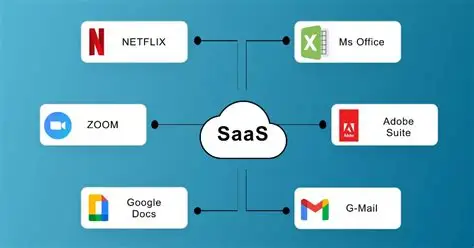
The easiest way to understand SaaS is to stop thinking about software.
Think about work instead.
A salesperson opens Salesforce to see a customer’s history. A designer works in Figma. The finance team closes the books in NetSuite. Employees communicate through Slack or Microsoft Teams. Marketing schedules campaigns in HubSpot. Engineers push code through GitHub. Someone in HR is quietly living inside Workday.
Nobody is thinking, I am using software as a service.
They are simply doing their jobs.
That is what makes SaaS—software as a service—so consequential. It has moved software from something companies install and maintain into something they continuously consume.
And the examples are everywhere.
But listing SaaS companies misses the more interesting story. The real question is what these applications reveal about how businesses buy software, organize work, manage data, and increasingly, delegate decisions to machines.
Because Salesforce, Slack, Shopify, Zoom, and thousands of less famous products are not merely applications.
They are pieces of an operating system for business.
What Is SaaS, Exactly?
SaaS is software delivered over the internet, typically through a web browser or application, with the provider responsible for hosting, infrastructure, maintenance, updates, and much of the underlying security.
Instead of purchasing software once and installing it on company-owned servers, customers generally pay for ongoing access.
That changes the economics.
The customer buys a service. The vendor operates the platform.
The familiar subscription model is one expression of SaaS, but it isn't the definition. A SaaS product can charge per user, per month, based on usage, by transaction, by feature tier, or through some combination of these approaches.
What matters is the delivery model.
A simple example
Imagine a company needs customer relationship management software.
Under an older software model, the company might purchase licenses, install the application on its own infrastructure, maintain servers, manage upgrades, and coordinate technical support.
With SaaS, employees typically log into a cloud platform. The provider handles the underlying infrastructure and continually updates the product.
That sounds like a technical distinction.
It isn't.
It changes who carries operational responsibility.
The Most Familiar SaaS Examples
Some SaaS products have become so embedded in business that their category is almost invisible.
Salesforce: CRM as a system of record
Salesforce is one of the clearest examples of enterprise SaaS.
Its core function is customer relationship management: organizing information about leads, prospects, customers, sales activity, and related business processes.
But the important part isn't the contact database.
It is the workflow around it.
Sales teams can manage opportunities. Managers can track pipelines. Marketing and service functions can connect customer information to their own processes.
The application becomes a shared reference point for how the organization understands its customers.
Microsoft 365: SaaS at enormous scale
Microsoft 365 demonstrates another characteristic of SaaS: a single platform can contain an entire collection of applications.
Word. Excel. PowerPoint. Outlook. Teams. OneDrive.
The customer isn't necessarily buying one application. It is buying access to an ecosystem.
That creates convenience, but it also creates strategic dependence. Once documents, communications, identities, files, calendars, and workflows accumulate inside a platform, switching becomes considerably more complicated than canceling a subscription.
Slack: communication becomes software
Slack illustrates how SaaS can reshape behavior rather than simply digitize an existing task.
Email existed long before Slack.
Slack reorganized internal communication around channels, direct messages, searchable conversations, integrations, and persistent collaboration spaces.
The lesson is subtle: some successful SaaS products don't merely replace an old tool.
They change the workflow itself.
Zoom: a focused SaaS product
Zoom is a useful counterexample to sprawling enterprise suites.
Its central proposition is relatively easy to understand: online video communications.
That simplicity can be powerful.
Not every SaaS company needs to become an operating system for an enterprise. Some win by making one important activity remarkably easy.
SaaS Examples by Business Function
The fastest way to understand the SaaS landscape is to organize it around the work being performed.
| Business Function | SaaS Examples | Primary Use | Typical Users | Core Business Value |
|---|---|---|---|---|
| CRM | Salesforce, HubSpot | Customer and sales management | Sales, marketing, service | Revenue management |
| Collaboration | Slack, Microsoft Teams | Communication and teamwork | Most employees | Coordination |
| Productivity | Microsoft 365, Google Workspace | Documents, email, spreadsheets | Most employees | Daily productivity |
| Project Management | Asana, Monday.com | Tasks and projects | Teams, managers | Execution visibility |
| Design | Figma | Collaborative design | Designers, product teams | Product development |
| HR | Workday, Rippling | HR, payroll, workforce administration | HR, employees | Workforce management |
| Finance | NetSuite, QuickBooks Online | Accounting and financial operations | Finance, executives | Financial control |
| Marketing | HubSpot, Marketo | Campaigns and marketing automation | Marketing teams | Demand generation |
| E-commerce | Shopify | Online storefronts and commerce | Merchants, retailers | Digital sales |
| Customer Support | Zendesk, Intercom | Support and customer communication | Support, success teams | Customer retention |
| Engineering | GitHub, GitLab | Code management and development | Developers | Software delivery |
| Analytics | Tableau, Power BI | Business intelligence | Analysts, executives | Decision support |
| Security | Okta, CrowdStrike | Identity and security operations | IT, security | Risk reduction |
| AI | OpenAI products, enterprise AI platforms | Generation, analysis, automation | Broad employee base | Productivity and decision support |
The table also reveals something that a simple list of SaaS examples cannot.
SaaS is no longer a category sitting inside the IT department.
It touches nearly every department.
SaaS Examples for Small Businesses
SaaS is particularly attractive to smaller companies because it reduces the need to build large internal technology infrastructures.
A small business might use:
- QuickBooks Online for accounting
- Shopify for e-commerce
- Google Workspace for email and documents
- HubSpot for CRM and marketing
- Zoom for meetings
- Canva for visual content
- Asana for project coordination
- Zendesk for customer support
The pattern is important.
A company with a few dozen employees can assemble a surprisingly sophisticated technology stack without operating its own data center or employing a large infrastructure team.
That is one of SaaS's great economic effects: capability becomes available before scale.
A startup doesn't need to become large before it can access enterprise-grade software.
SaaS Examples for Enterprises
Large companies use many of the same categories, but their requirements are different.
Enterprise SaaS has to coexist with identity systems, security controls, regulatory obligations, procurement rules, data architectures, legacy applications, and thousands—or hundreds of thousands—of employees.
A large enterprise might therefore combine:
- Salesforce for customer operations
- Workday for human resources
- ServiceNow for IT and enterprise workflows
- Microsoft 365 for productivity
- Okta for identity
- Snowflake for data infrastructure
- Tableau or Power BI for analytics
- Slack or Microsoft Teams for collaboration
- GitHub for software development
At that scale, the application itself is only part of the equation.
Integration becomes critical.
So does governance.
A company can have excellent SaaS applications and still have a terrible SaaS environment if nobody knows who owns them, what data they contain, how much they cost, or which employees have access.
Vertical SaaS: Software Built for a Specific Industry
Not all SaaS products try to serve everyone.
Vertical SaaS targets a particular industry or profession.
A healthcare provider might use specialized practice-management software. A construction company might use software designed around estimating, scheduling, and field operations. A restaurant group may use technology specifically built for reservations, point-of-sale operations, labor management, or inventory.
This specialization matters because industries have different workflows.
A generic project-management application can create tasks.
A construction platform can understand subcontractors, project phases, change orders, schedules, and field operations.
The software becomes more valuable when it understands the vocabulary and constraints of the customer.
That is the appeal of vertical SaaS.
Horizontal SaaS vs. Vertical SaaS
The distinction is worth making explicit.
| Characteristic | Horizontal SaaS | Vertical SaaS |
|---|---|---|
| Target market | Multiple industries | Specific industry |
| Workflow | General-purpose | Industry-specific |
| Examples | Microsoft 365, Slack | Industry-specific healthcare, construction, legal platforms |
| Customization | Often broad | Often domain-oriented |
| Specialized terminology | Limited | Extensive |
| Addressable market | Broad | Narrower |
| Domain expertise | Helpful | Central |
| Competitive advantage | Scale, ecosystem, integrations | Workflow depth, industry knowledge |
Neither model is inherently superior.
Horizontal SaaS can serve enormous markets.
Vertical SaaS can become deeply embedded in specialized workflows.
And increasingly, artificial intelligence is pushing the two models into interesting territory.
AI Is Creating a New Class of SaaS Examples
The next generation of SaaS products may not look like traditional software at all.
Consider an AI system that reviews contracts, summarizes customer interactions, writes software, analyzes financial documents, qualifies sales leads, or responds to support tickets.
The user may not think of the product as a conventional application.
They may think of it as a worker.
That distinction could reshape SaaS economics.
Traditional SaaS often sells access to functionality.
AI-infused SaaS increasingly sells completed work.
That creates new pricing questions.
Should the customer pay per employee? Per task? Per automated workflow? Per AI interaction? Per outcome?
The answers are still evolving.
What Makes a SaaS Product Valuable?
The best SaaS examples have something in common beyond subscription pricing.
They become embedded.
A CRM becomes embedded in the sales process.
A collaboration platform becomes embedded in communication.
An accounting system becomes embedded in financial reporting.
A design platform becomes embedded in product development.
The deeper the integration into organizational workflow, the more consequential the software becomes.
This also creates switching costs.
Not necessarily because cancellation is technically difficult, but because leaving means moving data, retraining employees, rebuilding integrations, changing processes, and accepting operational disruption.
That is why SaaS should be evaluated as infrastructure for work, not merely as an expense line.
The Lesson I Keep Coming Back To
When I think about SaaS examples, I’m less interested in the famous logos than in what happens after an organization adopts them.
A company rarely buys software in isolation.
It buys a new way of working.
That distinction is easy to miss.
A project-management platform changes meetings because project status becomes visible. A CRM changes sales behavior because opportunities become measurable. A collaboration platform changes communication because conversations become persistent and searchable.
The software is the visible object.
The workflow is the real product.
That is the lesson worth carrying into any SaaS evaluation.
Don't ask only, “What does this application do?”
Ask, “What will people do differently because it exists?”
That question gets much closer to value.
The Future of SaaS May Be Less About Apps
There is a strange paradox emerging.
Companies have accumulated thousands of SaaS applications, and now many are trying to consolidate them. At the same time, AI is making it easier to create specialized software and automated workflows.
Fewer applications may not mean less complexity.
It could mean that software becomes less visible.
Instead of opening ten applications, an employee might interact with one intelligent interface that reaches into ten systems.
The user sees simplicity.
Behind it sits an extraordinary amount of infrastructure.
That raises the more provocative question.
If SaaS increasingly becomes the machinery through which companies perform work, should businesses still manage software as a collection of applications—or start managing it as an interconnected operating system?
The answer matters because the next generation of SaaS won't simply store information or display dashboards.
It will increasingly act.
And once software begins acting on behalf of employees, the distinction between an application, an assistant, an automation, and a business process starts to disappear.
That is when SaaS stops being merely the software companies subscribe to.
It becomes the software through which companies operate.
- Arts
- Business
- Computers
- Jeux
- Health
- Domicile
- Kids and Teens
- Argent
- News
- Personal Development
- Recreation
- Regional
- Reference
- Science
- Shopping
- Society
- Sports
- Бизнес
- Деньги
- Дом
- Досуг
- Здоровье
- Игры
- Искусство
- Источники информации
- Компьютеры
- Личное развитие
- Наука
- Новости и СМИ
- Общество
- Покупки
- Спорт
- Страны и регионы
- World

 English
 Russian
 Spanish
 Portuguese
 Deutsch
 Turkish
 Dutch
Dutch
 Italiano
 Arabic
 Romaian
 Portuguese (Brazil)
 Greek
Greek