
SaaS Architecture Diagram
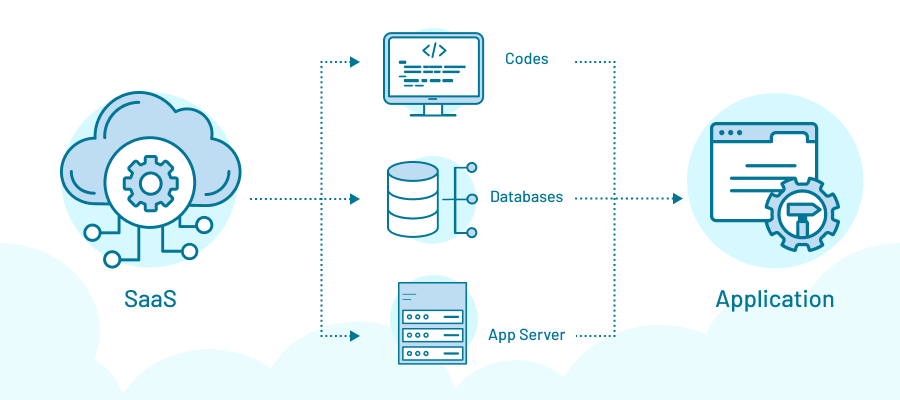
A SaaS application can look deceptively simple.
Open a browser. Enter a password. A dashboard appears.
The customer sees a product.
The engineering team sees something else entirely: networks, databases, APIs, authentication services, containers, queues, storage systems, monitoring tools, third-party integrations, and a long chain of dependencies that has to keep working even when traffic spikes, servers fail, credentials expire, or a customer uploads something nobody anticipated.
That hidden machinery is what a SaaS architecture diagram is designed to reveal.
It is not merely a picture of an application.
It is a map of how software receives requests, processes information, stores data, communicates with other systems, protects identities, and delivers a result to the customer.
And the better the SaaS architecture, the less the customer thinks about it.
That is the paradox.
The infrastructure becomes more sophisticated precisely so the experience can feel simpler.
What Is a SaaS Architecture Diagram?
A SaaS architecture diagram is a visual representation of the major technical components of a software-as-a-service application and the relationships between them.
It can show:
- Users and client devices
- Web and mobile interfaces
- DNS and content delivery networks
- Load balancers
- Application servers
- APIs
- Authentication services
- Databases
- Caches
- Message queues
- Object storage
- Monitoring systems
- External integrations
- Cloud infrastructure
- Security controls
The exact diagram varies because SaaS architecture varies.
A small application might have a frontend, backend, database, and authentication service.
A large enterprise SaaS platform can involve dozens of independently scaled services spread across multiple regions.
The diagram gives engineers, architects, security teams, and business stakeholders a common language for understanding that complexity.
A simplified SaaS architecture
At its most basic, the flow looks something like this:
User → Internet → CDN/Load Balancer → Application Layer → Database/Services → External Systems
That sequence is useful, but incomplete.
A production SaaS environment needs to answer harder questions.
What happens if the application server fails?
What happens if the database becomes unavailable?
How are customers isolated from one another?
Where are backups stored?
Who can access administrative functions?
How does the system scale from 100 users to 100,000?
What happens when an integration fails?
Architecture begins where the simple diagram ends.
The Core Layers of SaaS Architecture
Most SaaS architecture diagrams can be understood through several logical layers.
1. Presentation layer
This is what the user interacts with.
It may include:
- Web applications
- Mobile applications
- Desktop clients
- Administrative interfaces
Modern SaaS products frequently use frameworks such as React, Angular, Vue, or similar technologies for the frontend.
But the architectural point is more important than the framework.
The presentation layer should generally be separated from the underlying business logic so the interface can evolve without forcing the entire application to change.
2. Application layer
This is where business logic lives.
The application layer handles requests and performs actions such as:
- Creating accounts
- Processing orders
- Calculating invoices
- Updating records
- Enforcing permissions
- Running workflows
- Calling other services
This layer is often where a simple SaaS application starts becoming complicated.
A single application may initially contain everything.
As the product grows, certain functions may be separated into independent services.
3. Data layer
The data layer stores the information the application depends on.
That could include:
- Relational databases
- NoSQL databases
- Caches
- Search indexes
- Object storage
- Data warehouses
A SaaS architecture diagram should make data movement visible.
Where is customer data stored?
Which services can access it?
Which databases contain sensitive information?
How is data replicated?
How are backups handled?
Those are architectural questions, not merely database questions.
The SaaS Architecture Diagram, Layer by Layer
| Layer | Typical Components | Primary Function | Major Architectural Concern |
|---|---|---|---|
| Client | Browser, mobile app | User interaction | Performance, compatibility |
| Edge | DNS, CDN, WAF | Traffic entry and protection | Availability, security |
| Gateway | Load balancer, API gateway | Request routing | Scalability, traffic control |
| Application | Web servers, services | Business logic | Performance, maintainability |
| Authentication | Identity provider, OAuth, SSO | Identity and access | Security |
| Data | SQL, NoSQL, cache | Persistent information | Integrity, scalability |
| Messaging | Queues, event buses | Async communication | Reliability |
| Storage | Object storage | Files and large objects | Durability, access control |
| Integration | APIs, webhooks | External connectivity | Dependency management |
| Observability | Logs, metrics, traces | System visibility | Detection and diagnosis |
| Infrastructure | Cloud, containers, orchestration | Runtime environment | Resilience, automation |
The value of such a table—and of the diagram behind it—is that architecture becomes easier to discuss as a system rather than as a collection of technologies.
Multi-Tenant SaaS Architecture
One of the defining questions in SaaS architecture is tenancy.
A SaaS provider may serve hundreds, thousands, or millions of customers from a shared platform.
That introduces the multi-tenancy problem.
How do you share infrastructure without allowing one customer to see another customer's data?
There are several approaches.
Shared application, shared database
Multiple customers use the same application and database infrastructure, with records separated logically by tenant identifiers.
This can be efficient.
It can also demand extremely careful access controls.
One flawed query or authorization rule can create a serious data-isolation problem.
Shared application, separate databases
Customers may share application infrastructure while maintaining separate databases.
This can provide stronger isolation but increases operational complexity.
Dedicated environment
A customer may receive dedicated infrastructure or a dedicated database environment.
This can improve isolation and satisfy particular regulatory or enterprise requirements, but it is typically more expensive to operate.
The architectural choice is not simply technical.
It affects pricing, security, scalability, operations, and the vendor's ability to customize environments.
Authentication and Authorization
The login screen is one of the least interesting parts of identity architecture.
What happens after login is much more important.
A SaaS application needs to determine:
Who are you?
That is authentication.
Then:
What are you allowed to do?
That is authorization.
A mature architecture diagram might therefore show an identity provider, single sign-on, multifactor authentication, session management, role-based access control, and authorization services.
For enterprise SaaS, identity can become deeply integrated with customer systems.
Employees may authenticate through corporate identity providers using standards such as SAML or OpenID Connect.
The SaaS platform then has to translate that identity into application-level permissions.
One broken link in that chain can become a security problem.
APIs: The Connections Between SaaS Systems
Modern SaaS products rarely operate alone.
They connect to payment processors, CRM systems, identity providers, analytics platforms, communication tools, data warehouses, and thousands of other services.
APIs provide many of those connections.
A SaaS architecture diagram should therefore show major API relationships.
For example:
SaaS Application → Payment API → Payment Provider
or:
SaaS Application → Identity Provider → Enterprise Directory
These connections create leverage.
They also create dependencies.
If an external service changes its API, becomes unavailable, introduces rate limits, or experiences an outage, the SaaS product may feel the impact.
Integration architecture is therefore part of reliability architecture.
Why Caching Matters
Not every request needs to reach the database.
A cache can store frequently requested information closer to the application, reducing database load and improving response times.
A simplified flow might be:
Request → Application → Cache → Database if needed
Caching can be remarkably effective.
It can also produce strange failures.
The data in the cache may become stale. Cache invalidation can become difficult. A sudden traffic spike can overwhelm the underlying database when cached entries expire simultaneously.
This is one of those architectural details that seems minor until it isn't.
Message Queues and Asynchronous Processing
Some tasks do not need to happen immediately.
Suppose a user uploads a large document.
The application could process it synchronously, forcing the user to wait.
Or it could accept the upload, place a job on a queue, and let a background worker process the document.
The architecture becomes:
User → Application → Queue → Worker → Storage/Database
That separation improves responsiveness and can make systems more resilient.
It also introduces new questions.
What happens if the worker fails?
How many times should a job be retried?
What if the same task executes twice?
Architecture is largely the art of discovering these questions before production does.
Scalability: The Diagram Changes as the Company Grows
A SaaS application serving 1,000 users does not necessarily need the same architecture as one serving 10 million.
At smaller scale, simplicity has enormous value.
A straightforward application can be easier to operate, debug, and change.
As demand grows, organizations may introduce:
- Horizontal application scaling
- Load balancing
- Database replication
- Read replicas
- Distributed caching
- Asynchronous processing
- Container orchestration
- Multiple availability zones
- Multi-region deployment
But adding components is not synonymous with improving architecture.
Every additional service creates another thing to monitor, secure, deploy, and understand.
That is a lesson worth emphasizing.
Complexity has an operating cost.
The First-Person Lesson: The Diagram Is Often More Valuable Than the Technology List
One lesson I’ve learned from studying software architecture is that a list of technologies rarely tells you how a system actually works.
“PostgreSQL, Kubernetes, Redis, AWS, React.”
Fine.
But what happens when a customer clicks Submit?
That question forces the architecture into motion.
The request reaches the edge. Authentication is checked. The application validates the request. Business logic executes. Data may be retrieved from a cache. A database transaction occurs. An event may be published. A background job may begin.
Suddenly, the technology list becomes a system.
That is the real value of an architecture diagram.
It turns nouns into relationships.
And relationships are where failure, latency, security exposure, and operational responsibility tend to live.
SaaS Architecture and Security
Security should not sit beside the architecture diagram as an afterthought.
It belongs inside it.
A serious SaaS architecture considers:
- Encryption in transit
- Encryption at rest
- Identity and access management
- Network segmentation
- Secrets management
- API security
- Tenant isolation
- Audit logging
- Backup protection
- Vulnerability management
- Administrative access
- Security monitoring
The architecture should also identify trust boundaries.
Where does customer data enter the system?
Where does it leave?
Which third-party services receive it?
Which components have privileged access?
A diagram that shows only boxes and arrows but ignores trust boundaries is incomplete.
SaaS Architecture vs. Traditional Software Architecture
| Characteristic | Traditional On-Premises Architecture | SaaS Architecture |
|---|---|---|
| Infrastructure ownership | Customer | Usually provider |
| Deployment | Customer-managed | Provider-managed |
| Scaling | Often planned hardware | Cloud/elastic scaling |
| Updates | Customer-controlled | Provider-controlled |
| Tenancy | Often single organization | Often multi-tenant |
| Availability | Customer responsibility | Provider responsibility |
| Integrations | Often limited/local | API-centric |
| Monitoring | Customer-operated | Provider-operated |
| Disaster recovery | Customer-designed | Provider-designed/shared |
| Identity | Enterprise-local | Often cloud-integrated |
The distinction isn't absolute.
Large SaaS customers can still maintain significant infrastructure responsibilities, while modern enterprises increasingly use cloud architectures that resemble SaaS environments.
Architecture is converging.
Responsibilities are not.
What a Good SaaS Architecture Diagram Should Show
A useful diagram does not attempt to display every server.
It answers important questions.
At minimum, it should make clear:
- Who uses the system?
- How does traffic enter?
- Where does authentication happen?
- Where is business logic executed?
- Where is customer data stored?
- How do services communicate?
- Which external systems are connected?
- How does the platform scale?
- Where are security controls applied?
- What happens when a component fails?
That final question is particularly revealing.
A diagram showing the happy path describes a product.
A diagram showing failure paths begins to describe an architecture.
The Architecture Is the Business
It is tempting to think of SaaS architecture as an engineering concern.
Executives should resist that temptation.
Architecture affects uptime.
Uptime affects customer trust.
Data architecture affects compliance.
Integration architecture affects retention.
Scalability affects margins.
Security architecture affects enterprise sales.
Deployment architecture affects how quickly the product can evolve.
The boxes and arrows eventually become business outcomes.
That is why architecture decisions made early can echo through a SaaS company's economics for years.
The Provocative Conclusion
A SaaS architecture diagram looks like a technical artifact.
It isn't.
It is a picture of the company's promises.
If the diagram shows weak isolation, the company is making a weak promise about customer data.
If it shows a single point of failure, the company is making a fragile promise about availability.
If it shows dozens of external dependencies, the company is making a complicated promise about reliability.
And if nobody can explain what happens when one of those boxes fails, the problem isn't the diagram.
The problem is the architecture.
The best SaaS systems eventually make their complexity invisible to customers. That is precisely why someone inside the organization needs to make it visible on paper.
Because the browser window tells customers what the software does.
The architecture diagram tells you what the software is capable of surviving.
And as SaaS platforms become more interconnected, automated, AI-driven, and deeply embedded in business operations, that distinction becomes harder to ignore.
The future of SaaS architecture will not be defined simply by how many services an engineering team can deploy.
It will be defined by something more demanding:
How much complexity can the organization absorb without transferring that complexity—and its consequences—to the customer?
That is the architecture question that matters.
- Arts
- Business
- Computers
- Игры
- Health
- Главная
- Kids and Teens
- Деньги
- News
- Personal Development
- Recreation
- Regional
- Reference
- Science
- Shopping
- Society
- Sports
- Бизнес
- Деньги
- Дом
- Досуг
- Здоровье
- Игры
- Искусство
- Источники информации
- Компьютеры
- Личное развитие
- Наука
- Новости и СМИ
- Общество
- Покупки
- Спорт
- Страны и регионы
- World

 English
 French
 Spanish
 Portuguese
 Deutsch
 Turkish
 Dutch
Dutch
 Italiano
 Arabic
 Romaian
 Portuguese (Brazil)
 Greek
Greek