
What Are Virtual Machines?
Most people encounter virtual machines long before they understand what they are.
They launch an application in the cloud.
Deploy a website.
Spin up a development environment.
Restore a backup.
Run a business application.
Behind the scenes, a virtual machine quietly powers the experience.
Invisible. Flexible. Remarkably ordinary.
And yet virtual machines represent one of the most important technological shifts in modern computing.
Not because they introduced new hardware.
Quite the opposite.
They changed how we think about hardware altogether.
For decades, computing followed a straightforward rule: one physical server, one operating system, one workload. Organizations purchased machines, installed software, and dedicated resources to specific purposes.
The model worked.
It was also inefficient.
Many servers spent much of their lives underutilized, consuming power, occupying space, and requiring maintenance while using only a fraction of their available capacity.
Virtual machines challenged that assumption.
They introduced a provocative idea: what if one physical computer could behave like many independent computers simultaneously?
Today, that idea forms the foundation of cloud computing, enterprise infrastructure, software development, cybersecurity testing, and countless digital services.
Yet despite their ubiquity, virtual machines remain surprisingly misunderstood.
Understanding them requires looking beyond the buzzwords and focusing on a simple reality.
A virtual machine is not a piece of hardware.
It is software pretending to be hardware.
And that distinction changed everything.
What Is a Virtual Machine?
A virtual machine (VM) is a software-based computer that operates within a physical computer.
It behaves like an independent machine, complete with its own:
- Operating system
- Storage
- Memory
- CPU allocation
- Applications
- Network connections
From the perspective of the operating system running inside the VM, the environment appears completely real.
Windows believes it is running on a physical machine.
Linux believes it owns dedicated hardware.
Applications function normally.
Users interact as though nothing unusual is happening.
Yet underneath the surface, multiple virtual machines may be sharing the same physical server.
Each operates independently.
Each remains isolated from the others.
Each behaves as though it owns the entire system.
The illusion is extraordinarily convincing.
That illusion is also extraordinarily useful.
The Technology Behind Virtual Machines
Virtual machines depend on a specialized layer of software known as a hypervisor.
The hypervisor acts as a resource manager.
It allocates physical resources to virtual machines and ensures they remain separated from one another.
Without a hypervisor, virtual machines cannot exist.
What Does a Hypervisor Do?
The hypervisor manages:
- CPU resources
- Memory allocation
- Storage access
- Network connectivity
- Resource scheduling
Its job is deceptively complex.
Imagine several tenants sharing the same building while each believes they own the entire property.
The hypervisor makes that arrangement possible.
It distributes resources fairly while maintaining isolation between environments.
This balance between sharing and separation sits at the heart of virtualization.
Why Virtual Machines Became So Popular
Technology adoption rarely occurs because something is clever.
It occurs because something solves a problem.
Virtual machines solved several.
Simultaneously.
Better Resource Utilization
Traditional servers often operated at surprisingly low utilization rates.
Organizations purchased powerful hardware and then used only a fraction of its capacity.
Virtualization changed that equation.
Multiple virtual machines could share a single physical server, dramatically increasing efficiency.
Instead of maintaining ten lightly used servers, businesses could consolidate workloads onto fewer machines.
The economic implications were substantial.
Faster Deployment
Provisioning physical hardware takes time.
Purchasing equipment.
Installing components.
Configuring systems.
Testing environments.
Virtual machines can often be created within minutes.
That speed fundamentally altered infrastructure planning.
Organizations no longer needed to predict every future requirement months in advance.
Improved Flexibility
Virtual machines can be copied, moved, backed up, and restored far more easily than physical hardware.
Infrastructure became portable.
Workloads became mobile.
Businesses gained options they had never previously possessed.
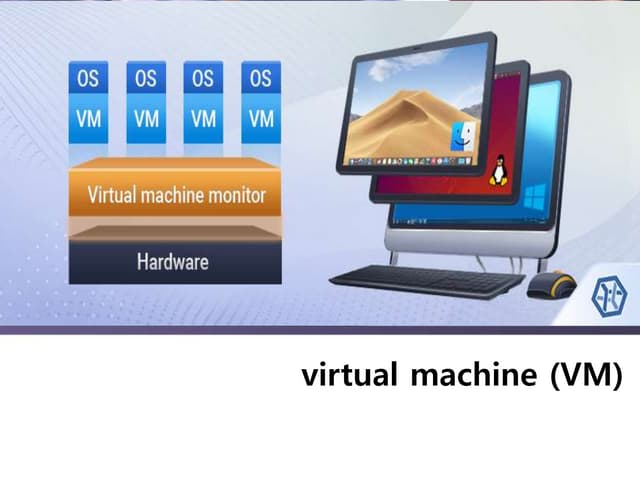
How Virtual Machines Work in Practice
To understand virtual machines, it helps to visualize the relationship between physical and virtual resources.
The Physical Layer
At the bottom sits the physical server.
This hardware includes:
- Processors
- Memory
- Storage drives
- Network interfaces
These components provide the raw resources.
The Hypervisor Layer
Above the hardware sits the hypervisor.
It acts as an intermediary between physical resources and virtual environments.
The hypervisor determines how resources are distributed.
The Virtual Machine Layer
Each virtual machine receives an assigned portion of resources.
The VM then operates independently.
It can run different operating systems.
Install different applications.
Serve different business functions.
All while sharing the same underlying hardware.
This architecture transformed the economics of computing.
Types of Virtual Machines
Not all virtual machines serve the same purpose.
Different environments require different approaches.
System Virtual Machines
System virtual machines emulate complete computer systems.
These are the VMs most organizations use.
They run full operating systems such as:
- Windows Server
- Ubuntu Linux
- Red Hat Enterprise Linux
- Microsoft Windows
System VMs support production applications, websites, databases, and enterprise services.
Process Virtual Machines
Process virtual machines focus on individual applications rather than entire operating systems.
A common example is the Java Virtual Machine (JVM).
Instead of virtualizing hardware, the JVM creates an environment in which Java applications can execute consistently across different platforms.
The objective is portability.
Write once.
Run almost anywhere.
Virtual Machines vs Physical Servers
The comparison remains relevant because organizations continue evaluating both options.
| Factor | Virtual Machines | Physical Servers |
|---|---|---|
| Deployment Speed | Minutes | Days or weeks |
| Scalability | High | Limited by hardware |
| Hardware Utilization | Efficient | Often underutilized |
| Initial Cost | Lower | Higher |
| Resource Isolation | Strong | Complete |
| Flexibility | Excellent | Limited |
| Maintenance Requirements | Reduced | Extensive |
| Portability | High | Minimal |
| Disaster Recovery | Simplified | More complex |
| Operational Agility | High | Moderate |
The table reveals something important.
Virtual machines are not necessarily superior in every category.
Physical servers still offer advantages for highly specialized workloads.
But for most business environments, virtualization provides a compelling balance between efficiency and performance.
Virtual Machines and Cloud Computing
Cloud computing would look very different without virtual machines.
In many ways, virtualization enabled the cloud revolution.
Infrastructure providers use virtual machines to deliver computing resources at scale.
Customers request servers through a portal.
Behind the scenes, virtual machines are provisioned and allocated.
The process feels instantaneous because virtualization makes it possible.
Infrastructure as a Service (IaaS) platforms rely heavily on virtual machines to deliver:
- Compute resources
- Storage services
- Networking capabilities
- Scalable infrastructure
The cloud did not eliminate servers.
It simply abstracted them.
Virtual machines made that abstraction practical.
The Lesson I Learned About Virtualization
Several years ago, I visited an organization preparing to replace a room full of aging servers.
The environment looked familiar.
Rows of equipment.
Flashing lights.
Endless cables.
Years of accumulated infrastructure decisions.
The team expected a costly hardware refresh.
Instead, consultants proposed virtualization.
Initial reactions ranged from skepticism to disbelief.
The idea that dozens of systems could safely operate on fewer physical machines felt counterintuitive.
Yet the migration proceeded.
Months later, the server room looked dramatically different.
Fewer machines.
Lower energy consumption.
Simplified management.
Improved reliability.
What struck me most was not the technology itself.
It was how quickly the conversation shifted.
People stopped discussing hardware.
They started discussing business outcomes.
That remains one of the most revealing lessons in infrastructure strategy.
The most valuable technologies often disappear into the background.
Benefits of Virtual Machines
The popularity of virtual machines stems from a broad collection of advantages.
Cost Efficiency
Organizations reduce hardware purchases while maximizing resource utilization.
Scalability
New virtual machines can be created rapidly as demand increases.
Isolation
Problems affecting one VM rarely impact others.
This separation improves reliability and security.
Business Continuity
Virtual machines can be backed up, replicated, and restored efficiently.
Recovery becomes faster and more predictable.
Testing and Development
Developers can create temporary environments without purchasing dedicated hardware.
Experimentation becomes easier.
Innovation accelerates.
Challenges and Limitations
Virtual machines are powerful.
They are not perfect.
Resource Competition
Multiple VMs share physical resources.
Poor resource allocation can affect performance.
Complexity
Large virtualized environments require careful management.
Without oversight, infrastructure can become difficult to control.
Licensing Costs
Certain software licensing models become more complicated in virtualized environments.
Organizations must account for these considerations.
Performance Overhead
Although modern virtualization is highly efficient, some workloads perform better on dedicated physical hardware.
The difference is often small.
In specific scenarios, it remains relevant.
Why Virtual Machines Still Matter
Technology trends move quickly.
New architectures emerge.
Containers gain popularity.
Serverless computing attracts attention.
Yet virtual machines continue to play a foundational role.
Why?
Because they solve a fundamental business problem.
They allow organizations to separate computing workloads from physical hardware.
That separation creates flexibility.
Flexibility creates efficiency.
Efficiency creates opportunity.
The underlying principle remains as valuable today as it was when virtualization first gained traction.
Conclusion: The Most Important Computer You May Never See
Virtual machines are curious inventions.
They are everywhere, yet largely invisible.
Businesses depend on them daily while rarely discussing them outside IT departments.
Their greatest achievement may be psychological rather than technical.
They persuaded organizations to stop thinking about computers as physical objects and start thinking about computing as a resource.
That shift paved the way for cloud infrastructure, scalable applications, global platforms, and modern digital services.
A virtual machine is, at its simplest, software pretending to be hardware.
Yet that deceptively simple idea transformed how the world builds technology.
And perhaps that is the most remarkable aspect of all.
The machines that reshaped modern computing are not physical machines at all.
- Arts
- Business
- Computers
- Jogos
- Health
- Início
- Kids and Teens
- Money
- News
- Personal Development
- Recreation
- Regional
- Reference
- Science
- Shopping
- Society
- Sports
- Бизнес
- Деньги
- Дом
- Досуг
- Здоровье
- Игры
- Искусство
- Источники информации
- Компьютеры
- Личное развитие
- Наука
- Новости и СМИ
- Общество
- Покупки
- Спорт
- Страны и регионы
- World

 English
 Russian
 French
 Spanish
 Portuguese
 Deutsch
 Turkish
 Dutch
Dutch
 Italiano
 Arabic
 Romaian
 Greek
Greek
