
How Does Auto Scaling Work?
A product launch was scheduled for midnight.
The engineering team had prepared for weeks.
They reviewed application performance.
They tested database capacity.
They monitored infrastructure dashboards.
They built contingency plans.
Everything looked ready.
Then the unexpected happened.
Within minutes of launch, user traffic exceeded forecasts by several multiples.
Years earlier, this would have triggered an emergency response.
Engineers would have been paged.
Servers would have been manually upgraded.
Capacity discussions would have dominated the following days.
Instead, something almost invisible happened.
The application environment expanded.
Additional resources became available.
Traffic continued flowing.
The team watched the metrics climb, then stabilize.
One engineer described the experience afterward in a way that stayed with me:
“It felt strange. We prepared for a crisis, and the system simply handled it.”
That moment captures the appeal of auto scaling.
The infrastructure adapts.
The application responds.
Resources follow demand.
But behind that simplicity exists a sophisticated system of decisions, measurements, and automated actions.
Auto scaling is not merely adding servers when traffic increases.
It is a continuous conversation between applications, platforms, and the changing needs of users.
Understanding how that conversation works reveals why auto scaling has become a foundational capability in modern cloud environments.
What Is Auto Scaling?
Auto scaling is the process of automatically adjusting computing resources based on application demand.
Instead of relying on administrators to manually add or remove infrastructure, automated systems monitor conditions and make scaling decisions according to predefined rules.
The objective is straightforward:
Provide enough resources to maintain performance without paying for unnecessary capacity.
When demand rises, resources increase.
When demand falls, resources decrease.
The result is a more flexible and efficient operating model.
Why Auto Scaling Exists
Traditional infrastructure planning depended heavily on prediction.
Organizations estimated future demand.
They purchased hardware.
They hoped forecasts were accurate.
This created two common problems.
Overprovisioning
Organizations purchased more capacity than they needed.
The infrastructure sat unused while still generating costs.
Underprovisioning
Demand exceeded available capacity.
Applications slowed.
Users experienced poor performance.
Neither scenario was ideal.
Auto scaling introduced a different approach.
Instead of predicting every future scenario, organizations could allow systems to respond dynamically.
The infrastructure became adaptive.
The Core Components of Auto Scaling
Although implementations vary, most auto scaling systems rely on several fundamental components.
Monitoring
The system must understand what is happening.
Monitoring collects information about:
- CPU usage
- Memory consumption
- Network activity
- Request volume
- Application latency
- Queue depth
Without accurate measurements, scaling decisions become unreliable.
Scaling Policies
Policies define when and how resources should change.
Examples:
- Add servers when CPU exceeds 70%
- Remove servers when traffic drops below a threshold
- Increase capacity during scheduled events
Policies translate business requirements into automated behavior.
Resource Provisioning
Once a scaling decision occurs, the platform creates or removes resources.
This may involve:
- Virtual machines
- Containers
- Application instances
- Database capacity
- Serverless functions
The process happens automatically.
Load Distribution
When new resources become available, traffic must be distributed effectively.
Load balancers direct requests across available instances.
Without this step, additional capacity provides little benefit.
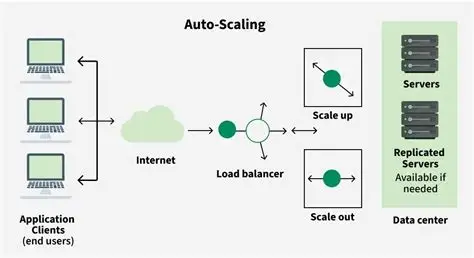
How Auto Scaling Works Step by Step
The process follows a continuous cycle.
Step 1: Measure Demand
The system collects performance information.
For example:
An online store experiences increased traffic.
Request volume rises.
CPU utilization increases.
The monitoring system detects the change.
Step 2: Compare Conditions Against Rules
The auto scaling engine evaluates current conditions.
It asks:
Does the workload exceed defined limits?
Should additional resources be created?
Should existing resources be removed?
The answer depends on configured policies.
Step 3: Add or Remove Resources
If scaling conditions are met, the system takes action.
For increased demand:
- New application instances launch
- Resources become available
- Traffic is distributed
For reduced demand:
- Extra instances are removed
- Costs decrease
Step 4: Continue Monitoring
Auto scaling never truly finishes.
The system continues observing conditions.
Demand changes.
The system responds.
The cycle repeats.
Types of Auto Scaling
Auto scaling is not a single technique.
Different approaches solve different problems.
Horizontal Scaling
Horizontal scaling adds more instances.
Example:
One application server becomes five application servers.
This approach is common in cloud environments because it allows workloads to distribute across multiple resources.
Advantages:
- High availability
- Better traffic handling
- Flexible growth
Challenges:
- Requires application compatibility
- Requires effective load balancing
Vertical Scaling
Vertical scaling increases the power of existing resources.
Example:
A server receives additional CPU or memory.
Advantages:
- Simpler implementation
- Useful for certain workloads
Challenges:
- Physical limits exist
- Downtime may sometimes be required
Predictive Scaling
Predictive scaling uses historical patterns to anticipate demand.
Instead of reacting after traffic increases, the system prepares beforehand.
Examples:
- Holiday shopping periods
- Scheduled product launches
- Seasonal usage patterns
This approach combines historical analysis with automation.
Reactive Scaling
Reactive scaling responds to current conditions.
The system observes demand changes and reacts.
This is the most common auto scaling model.
It is effective.
It can also introduce delays because resources must be created after demand appears.
Auto Scaling Methods Comparison
| Scaling Method | How It Works | Best Use Cases | Main Limitation |
|---|---|---|---|
| Horizontal Scaling | Adds application instances | Web apps, APIs, SaaS platforms | Requires scalable architecture |
| Vertical Scaling | Adds power to existing resources | Databases, specialized workloads | Hardware limits |
| Predictive Scaling | Forecasts future demand | Seasonal traffic patterns | Requires historical data |
| Reactive Scaling | Responds to current metrics | Variable workloads | May react after demand begins |
| Scheduled Scaling | Changes capacity at known times | Planned events | Less flexible |
The strongest environments often combine multiple approaches.
What Metrics Trigger Auto Scaling?
Auto scaling depends on signals.
The quality of those signals determines the quality of scaling decisions.
Common triggers include:
CPU Utilization
A classic scaling metric.
High processor usage may indicate that additional capacity is needed.
Memory Usage
Applications consuming excessive memory may require additional resources.
Request Rate
Growing numbers of incoming requests often indicate increased demand.
Response Time
Slow application responses may trigger additional capacity.
Queue Length
Background processing systems frequently scale based on pending work.
The best scaling strategies use multiple indicators rather than relying on a single metric.
A Lesson Learned From a Scaling Failure
I once observed a company prepare for a major customer event.
The organization had invested heavily in auto scaling.
The architecture looked modern.
The infrastructure configuration appeared correct.
During the event, traffic increased exactly as expected.
The application servers scaled.
Yet users still experienced delays.
The problem was unexpected.
The database had become the bottleneck.
Additional application servers created more requests, but the database could not process them quickly enough.
The scaling system worked perfectly.
The architecture around it did not.
That experience highlighted an important principle:
Auto scaling solves capacity problems.
It does not automatically solve design problems.
The Role of Application Architecture
Auto scaling works best when applications are designed for flexibility.
Strong candidates often have:
- Stateless application layers
- Externalized session storage
- Efficient databases
- Independent services
- Container-friendly architectures
Applications built around fixed infrastructure assumptions may struggle.
Adding resources does not help if the application cannot use them effectively.
Auto Scaling and Cost Management
One of the major benefits of auto scaling is financial efficiency.
Without automation, organizations often maintain capacity for peak demand.
That means paying for resources that may remain unused most of the time.
Auto scaling allows closer alignment between:
- Resource consumption
- User demand
- Business activity
However, automation does not guarantee lower costs.
Poorly configured scaling rules can create unnecessary expenses.
Examples:
- Creating too many instances
- Scaling too aggressively
- Failing to remove unused resources
Effective auto scaling requires monitoring cost as carefully as performance.
Common Auto Scaling Challenges
Despite its advantages, auto scaling introduces complexity.
Scaling Too Slowly
Resources may arrive after users already experience performance issues.
Scaling Too Quickly
Excessive resources may increase costs unnecessarily.
Poor Metrics
Incorrect triggers lead to ineffective decisions.
Application Limitations
Some systems cannot take advantage of additional resources.
Dependency Bottlenecks
External services may limit scalability.
These challenges do not reduce the value of auto scaling.
They highlight the importance of thoughtful implementation.
Auto Scaling in PaaS Environments
Platform as a Service providers often include auto scaling as a built-in capability.
The platform handles much of the operational complexity.
Developers configure:
- Scaling rules
- Resource limits
- Performance targets
The platform manages infrastructure changes.
This allows development teams to focus on applications rather than servers.
For many organizations, this represents the central appeal of PaaS.
The Future of Auto Scaling
Auto scaling continues to evolve.
Modern systems increasingly incorporate:
- Artificial intelligence
- Predictive analytics
- Real-time optimization
- Automated cost controls
Future platforms will likely become better at anticipating demand rather than simply responding to it.
The goal is not merely faster scaling.
It is smarter scaling.
Conclusion: Auto Scaling Is Automation With Judgment Built In
So, how does auto scaling work?
It observes.
It evaluates.
It adjusts.
It continuously balances application demand with available resources.
The mechanics are sophisticated, but the concept is elegant:
Give systems the ability to adapt.
Yet the most important lesson is often overlooked.
Auto scaling is not a replacement for good engineering.
It is a multiplier of good engineering.
A well-designed application becomes more resilient, efficient, and responsive when paired with intelligent scaling.
A poorly designed application simply encounters new problems at greater speed.
The organizations that benefit most from auto scaling understand this distinction.
They do not view automation as a way to remove responsibility.
They view it as a way to redirect responsibility toward more valuable work.
Less time managing infrastructure.
More time improving experiences.
Less time reacting to capacity problems.
More time building what customers actually need.
That is the true promise of auto scaling.
Not that systems grow automatically.
But that organizations can grow without being limited by systems.
- Arts
- Business
- Computers
- Jocuri
- Health
- Home
- Kids and Teens
- Money
- News
- Personal Development
- Recreation
- Regional
- Reference
- Science
- Shopping
- Society
- Sports
- Бизнес
- Деньги
- Дом
- Досуг
- Здоровье
- Игры
- Искусство
- Источники информации
- Компьютеры
- Личное развитие
- Наука
- Новости и СМИ
- Общество
- Покупки
- Спорт
- Страны и регионы
- World

 English
 Russian
 French
 Spanish
 Portuguese
 Deutsch
 Turkish
 Dutch
Dutch
 Italiano
 Arabic
 Portuguese (Brazil)
 Greek
Greek